- Docs
- Integrations
- n8n
n8n astrology node for workflows and AI agents
Ship a daily horoscope email, a natal chart on form submit, or an AI agent that calls live calculations as tools, on n8n in about 15 minutes, on Cloud or self-hosted.
The official RoxyAPI node is the shortest path: install it once, save your key once, and every one of the 261+ endpoints is a Resource and an Operation to pick, with the inputs as form fields. The HTTP Request node reaches the same API with nothing to install, and the MCP Client Tool node gives an AI Agent a whole domain of tools at once.
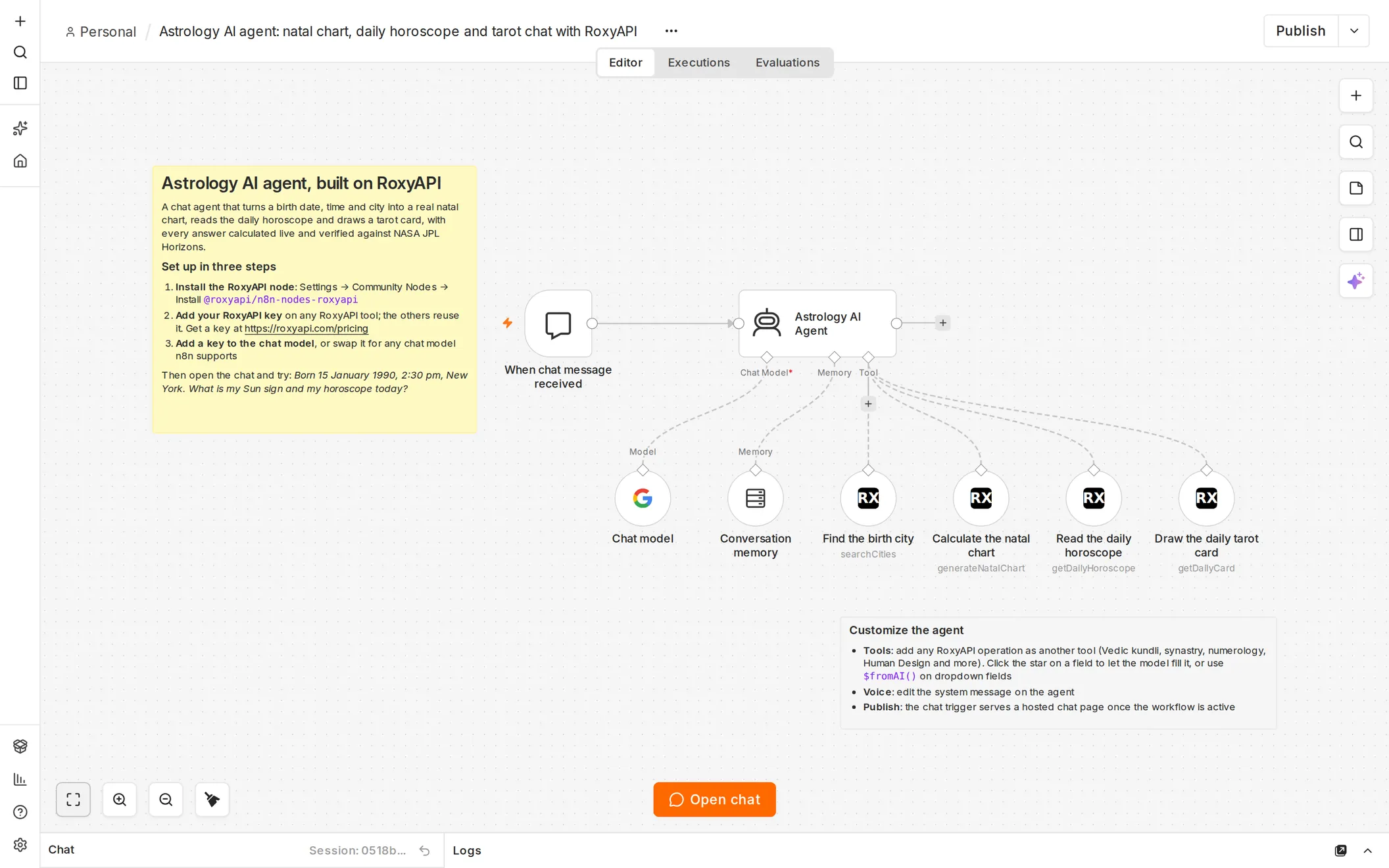
Want a working agent before reading on? The n8n astrology AI agent template is a chat companion ready to import: it finds the birth city, calculates the natal chart, reads the daily horoscope and draws a tarot card, with memory across turns. Watch it built from an empty canvas in the video tutorial, under three minutes long.
The call that proves it
Run this in a terminal before you build anything. A 200 here means the key is good, so anything that fails next is wiring.
curl "https://roxyapi.com/api/v2/astrology/horoscope/aries/daily" \
  -H "X-API-Key: $ROXY_API_KEY"
No key yet? One key covers every domain and checkout is instant: pricing.
Install the RoxyAPI node
- Open Settings → Community Nodes → Install.
- Enter
@roxyapi/n8n-nodes-roxyapi, tick the risk acknowledgement n8n shows for every community node, and install. - Add a node to any workflow and search for RoxyAPI.
- In Credential to connect with, pick Create new credential and paste your key from your account into API Key. n8n checks the key when you save.
- Pick Resource
Western Astrology, OperationGet Daily Horoscope, SignAries, and run it. The response is the same JSON as the curl above.
Required inputs show as fields. Everything optional, including Language and Timezone, sits under Options → Add Option.
The key goes in the credential, nowhere else
Never paste the key into a node field or an expression. The credential is encrypted by n8n and stays out of exported workflows; a field value travels with every workflow you export or share.
The node installs from Settings → Community Nodes on self-hosted n8n. n8n Cloud installs only community nodes that n8n has verified, so on Cloud use the HTTP Request path below until RoxyAPI appears in the nodes panel.
Or call any endpoint with the HTTP Request node
No install, and the same API:
- Add an HTTP Request node.
- Method
GET. URLhttps://roxyapi.com/api/v2/astrology/horoscope/aries/daily. - Authentication, pick Generic Credential Type, then Header auth.
- Create the credential: Name
X-API-Key, Value your key from your account. Rename the credential itselfRoxyAPI keyso it reads well in the dropdown. - Run the node. You get clean JSON with no wrapper:
sign,date,overview,love,career,health,finance,advice,column,events,luckyNumber,luckyColor,compatibleSigns,activeTransits,moonSign,moonPhase,energyRating.
Every later node picks that same credential from a dropdown. n8n encrypts credentials in its own database, so the value stays out of the node fields and out of an exported workflow, which carries only the credential name.
Faster start from the reference
The API reference gives you a ready curl for any endpoint. Paste it into Import cURL on the HTTP Request Parameters tab and n8n fills in method, URL, and headers. One catch from the n8n docs: cURL import brings every value in as a string, so for a body with real numbers switch Specify Body to Using JSON afterwards. Then move the key out of the pasted header and onto the credential.
What you can build with the RoxyAPI node
Every workflow below is one RoxyAPI node: pick the Resource and Operation, fill the required fields (map them from a form, a sheet or a webhook with expressions), and pass the JSON to any next node. The rows lead each domain with its most used calculation.
| Build this | Resource → Operation | Required fields |
|---|---|---|
| Daily horoscope email, post or push | Western Astrology → Get Daily Horoscope | Sign |
| Natal chart when a form is submitted | Western Astrology → Generate Natal Chart | Date, Time, Latitude, Longitude, Timezone |
| Love compatibility for a dating flow | Western Astrology → Calculate Synastry or Calculate Compatibility | Person1, Person2 |
| Vedic birth chart (kundli) | Vedic Astrology → Generate Birth Chart | Date, Time, Latitude, Longitude |
| Daily panchang for a city | Vedic Astrology → Get Detailed Panchang | Date, Latitude, Longitude |
| Kundli matching (gun milan) | Vedic Astrology → Calculate Gun Milan | Person1, Person2 |
| Upcoming transits for a user | Forecast → Forecast Transits | Birth Data |
| Human Design bodygraph | Human Design → Generate Bodygraph | Date, Time, Timezone |
| Chinese BaZi four pillars | Chinese Astrology → Generate Bazi Chart | Date, Time, Timezone |
| Feng shui Kua number | Feng Shui → Calculate Kua Number | Date, Gender |
| Life Path number | Numerology → Calculate Life Path | Year, Month, Day |
| Tarot reading bot | Tarot → Cast Three Card or Get Daily Card | none |
| Daily biorhythm | Biorhythm → Get Reading | Birth Date |
| I Ching reading | I-Ching → Cast Reading | none |
| Birthstones and crystals by sign | Crystal and Healing Stone → Get Crystals by Zodiac | Sign |
| Dream symbol lookup | Dream → Get Dream Symbol | ID |
| Angel number meaning | Angel Number → Get Angel Number | Number |
Charts need coordinates, so put Location and Timezone → Search Cities (field Query) in front of them and map latitude, longitude and timezone from its first city. Every Resource holds more operations than this table: open the node and they are listed by domain.
Send birth data with a POST
Charts, panchang, dasha, compatibility and synastry all take a birth moment.
- Resource
Western Astrology, OperationGenerate Natal Chart. - Map the five required fields with expressions: Date
{{ $json.birth_date }}, Time{{ $json.birth_time }}, Latitude{{ $json.latitude }}, Longitude{{ $json.longitude }}, Timezone{{ $json.timezone }}. - House System, Node Type and Language are under Options when you need them.
The node sends Latitude and Longitude as numbers, and a Timezone that looks like a number (-5, 5.5) as a number too, so there is no JSON body to get wrong.
- Method
POST, URLhttps://roxyapi.com/api/v2/astrology/natal-chart. - Turn on Send Body. Body Content Type
JSON. Specify BodyUsing JSON. - Paste:
{
  "date": "{{ $json.birth_date }}",
  "time": "{{ $json.birth_time }}",
  "latitude": {{ $json.latitude }},
  "longitude": {{ $json.longitude }},
  "timezone": "{{ $json.timezone }}"
}
date is YYYY-MM-DD and time is HH:MM:SS, both required, as are latitude, longitude and timezone. Optional houseSystem (placidus by default) and nodeType (true by default) sit alongside them.
curl -X POST "https://roxyapi.com/api/v2/astrology/natal-chart" \
  -H "X-API-Key: $ROXY_API_KEY" \
  -H "Content-Type: application/json" \
  -d '{
    "date": "1990-05-12",
    "time": "14:30:00",
    "latitude": 40.7128,
    "longitude": -74.0060,
    "timezone": "America/New_York"
  }'
If you move logic into a Code node or a custom node later, the typed client is one install:
import { createRoxy } from '@roxyapi/sdk';
const roxy = createRoxy(process.env.ROXY_API_KEY!);
const { data } = await roxy.astrology.generateNatalChart({
  body: {
    date: '1990-05-12',
    time: '14:30:00',
    latitude: 40.7128,
    longitude: -74.0060,
    timezone: 'America/New_York',
  },
});
Resolve the city first, never ask for coordinates
No visitor knows their birth latitude. Put a HTTP Request node on GET https://roxyapi.com/api/v2/location/search?q=berlin ahead of the chart node and read cities[0].latitude, cities[0].longitude and cities[0].timezone from it. The timezone it returns is an IANA name, which is what you want: the server resolves it to the correct offset for the birth date, so a summer birth and a winter birth are both right. A decimal offset like 5.5 is accepted but cannot know about daylight saving.
The response is plain JSON, so every field maps in any downstream node. planets is an array of objects with name, sign, degree, house, isRetrograde, dignity and more, so use a Split Out node to fan it out, or pick one inline:
{{ $json.planets.filter(p => p.name === 'Sun')[0].sign }}Ship a daily horoscope email
Three nodes, start to finish.
- Schedule Trigger at 08:00 daily.
- RoxyAPI, Resource
Western Astrology, OperationGet Daily Horoscope, SignAries. Under Options, add Timezone with the timezone of your readers, such asAmerica/New_York, so the day turns over on their clock. With the HTTP Request node, the same call ishttps://roxyapi.com/api/v2/astrology/horoscope/aries/daily?timezone=America/New_York. - Gmail send, subject
Your daily horoscope, body{{ $json.column }}: the complete column for the day, 120 to 180 words, ready to send. For a push notification or SMS, send the 30 to 60 word{{ $json.overview }}instead.
To cover all twelve signs, add a Loop Over Items node over the sign list and a short Wait between iterations rather than firing twelve calls at once.
Set the Language option on the node, or add ?lang= to any URL, for one of ten languages (en, tr, de, es, hi, pt, fr, ru, zh-Hans, zh-Hant). The prose translates, and so does the sign a horoscope returns (?lang=hi returns सिंह for Leo), so branch an IF or Switch node on the sign you sent, never on the one that comes back.
Give an AI agent the tools
This is where breadth on one key pays off: instead of wiring one endpoint per tool, you connect one server and the agent gets a whole domain.
Every domain has a Remote MCP server whose tools are generated from that domain spec, so you wire one node and the agent gets all of them.
- Add an AI Agent node and connect a chat model.
- Connect an MCP Client Tool node to the agent Tools input.
- Endpoint
https://roxyapi.com/mcp/astrology. Swap the last segment for any domain slug:vedic-astrology,tarot,numerology,human-design,location. - Server Transport
HTTP Streamable. Our servers are Streamable HTTP, not SSE. - Authentication
Header Auth, and select the sameRoxyAPI keycredential from the HTTP call above.Bearer Authwith the key as the token works too. - Tools to Include
Allto start. Once the agent works, switch toSelectedand keep only what the assistant needs, because every exposed tool is a definition the model reads on every turn.
Add one MCP Client Tool node per domain. Include the location server whenever a chart is in play so the agent can turn a city name into coordinates by itself.
Use a secret key here. Publishable pk_ keys are refused on the MCP endpoints.
For a few chosen operations, hand the agent the node itself.
- Connect a RoxyAPI node to the agent Tools input and pick the Resource and Operation, for example
Western AstrologyandGenerate Natal Chart. - On each field the model should fill, click Let the model define this parameter (the star at the end of the field). Fields you set yourself stay fixed. A dropdown field, such as Sign, has no star: switch it to Expression and write
{{ $fromAI('sign', 'Zodiac sign in lowercase, for example scorpio') }}. - Add one RoxyAPI tool per operation the agent may call, and name each one clearly, because that name is what the model reads when it decides whether to call it.
The astrology AI agent template is this pattern finished: four RoxyAPI tools, a system message that resolves the city before any chart, and a hosted chat page. The video tutorial builds it step by step.
For a single endpoint, skip MCP and hand the agent one HTTP Request node instead.
- Connect an HTTP Request node to the agent Tools input.
- Put the model-supplied value in the URL with
$fromAI, which takes a key, then an optional description, type and default:https://roxyapi.com/api/v2/astrology/horoscope/{{ $fromAI('sign', 'Zodiac sign, lowercase, for example aries', 'string', 'aries') }}/daily - Use the
RoxyAPI keycredential. - Give the node a clear name and description. That text is what the model reads when it decides whether to call it.
Cache what does not change
n8n does not cache HTTP responses. A horoscope is the same all day for a given sign, so store it: a Data table (built into n8n) or a Postgres table keyed by sign and date. Read the store, call RoxyAPI only on a miss, write the result back. One fetch per sign per day, however much traffic the workflow serves. The caching guide has the shelf life of every endpoint type.
Gotchas
The key ends up in my exported workflow
That happens with Import cURL, which pastes the header value straight into the node. Move it to a Header auth credential and the export carries only a reference.
I get 400 back and cannot tell which field is wrong
A 400 carries issues[] listing every field problem at once, so read that array rather than guessing one field at a time. All errors are { error, code, doc_url }. Retry only on 429 and on 5xx, never on a 400.
My numbers arrive as strings
cURL import types every imported value as a string. Switch Specify Body to Using JSON and write latitude and longitude unquoted.
ECONNREFUSED on a self-hosted instance
The container cannot reach roxyapi.com. Check outbound HTTPS on port 443, the firewall, and DNS inside the container.
405 with an allow list in the response
Wrong method. The response names the methods that path accepts. Horoscopes and moon phases are GET; charts, spreads and readings are POST.
429 in the middle of a loop
You are through your monthly request allowance. Put a Wait node inside the loop, cache daily content, or move up a plan. See authentication for the quota headers on every response.
The agent tool runs the wrong operation
Adding RoxyAPI from the agent Tool picker inserts it with its first operation. Open the tool and set Resource and Operation to the one the agent should call.
My $fromAI expression fails on every call
The expression editor closes {{ for you, so typing the closing }} as well leaves }} }} and the field never evaluates. Check that the expression ends with exactly one }}.
RoxyAPI does not appear when I search the nodes panel
Install it first, from Settings → Community Nodes → Install with @roxyapi/n8n-nodes-roxyapi. On n8n Cloud, only community nodes that n8n has verified can be installed; until RoxyAPI is one of them, use the HTTP Request node with a Header auth credential, which reaches every endpoint the node does.
Pick the next endpoint
- Domain guides, for which endpoints to call and in what order: Western Astrology, Vedic Astrology, KP Astrology, Human Design, Forecast, Chinese Astrology, Feng Shui, Biorhythm, Tarot, Numerology, I-Ching, Dreams, Crystals, Angel Numbers, Ayurveda, Kabbalah, Vastu, Mesoamerican Astrology.
- Common in workflows:
GET /astrology/horoscope/{sign}/daily,POST /astrology/natal-chart,POST /astrology/compatibility-score,POST /vedic-astrology/birth-chart,POST /vedic-astrology/panchang/detailed,POST /tarot/spreads/three-card,POST /numerology/life-path,POST /biorhythm/daily. - Make and Zapier run the same patterns on adjacent platforms.
- The Remote MCP guide covers the agent side in depth, and the AI chatbot tutorial builds one end to end.
FAQ
Is there an official RoxyAPI node for n8n?
Yes. @roxyapi/n8n-nodes-roxyapi is the official RoxyAPI community node. It covers every endpoint across 18 domains as a Resource and an Operation, stores the key in one encrypted credential, and works as a normal workflow step or as a tool for the n8n AI Agent. Install it from Settings → Community Nodes on self-hosted n8n.
Is there a ready n8n astrology AI agent template?
Yes. The n8n astrology AI agent template is an MIT workflow you import from a file: a chat trigger, an AI Agent with memory, and RoxyAPI tools that find the birth city, calculate the natal chart, read the daily horoscope and draw a tarot card. Add your RoxyAPI key and a chat model key, and it answers birth chart questions from live calculations. A video tutorial shows the same agent built from scratch.
How do I let the n8n AI Agent choose the zodiac sign?
Add the RoxyAPI node to the Tools input of the AI Agent, pick Western Astrology and Get Daily Horoscope, switch the Sign field to Expression, and write {{ $fromAI('sign', 'Zodiac sign in lowercase') }}. The model then fills the sign from the conversation, so asking about Scorpio calls the horoscope for Scorpio.
Can I use the RoxyAPI node on n8n Cloud?
n8n Cloud installs only community nodes that n8n has verified. Self-hosted n8n installs the RoxyAPI node from Settings → Community Nodes today; on Cloud, the HTTP Request node with a Header auth credential reaches every endpoint the node does.
Can n8n call an astrology API without any code?
Yes. The RoxyAPI node turns every endpoint across 18 domains into a form with a Resource, an Operation and input fields. Without installing anything, one HTTP Request node with a Header auth credential named X-API-Key reaches the same endpoints. Neither path needs a Code node.
How do I use RoxyAPI as a tool for an n8n AI Agent?
Two ways. For a whole domain at once, connect an MCP Client Tool node to the Tools input of the AI Agent, set the Endpoint to https://roxyapi.com/mcp/{domain}, set Server Transport to HTTP Streamable, and pick Header Auth with your X-API-Key credential. For a few chosen calculations, connect the RoxyAPI node itself as a tool, pick the Resource and Operation, and let the model fill the fields with Let the model define this parameter or $fromAI().
Where does n8n store my API key?
In a credential, which n8n encrypts in its database. The value stays out of the node fields and out of an exported workflow, which carries only the credential name. Importing a cURL command instead writes the key into the node itself, which is fine for a quick test and wrong for anything you export or share.
How do I turn a birth city into coordinates in n8n?
Call GET /location/search?q={city} in an HTTP Request node before the chart node and read latitude, longitude and timezone off the first city in the cities array. The timezone comes back as an IANA name, which handles daylight saving for the birth date automatically.
Does the free n8n tier work with RoxyAPI?
Yes. Self-hosted n8n is free and there is nothing paid on the RoxyAPI side of the wiring either: the RoxyAPI node is free to install, and the HTTP Request node, credentials, and the MCP Client Tool node are all standard. You need a RoxyAPI key, and one key covers all 18 domains.