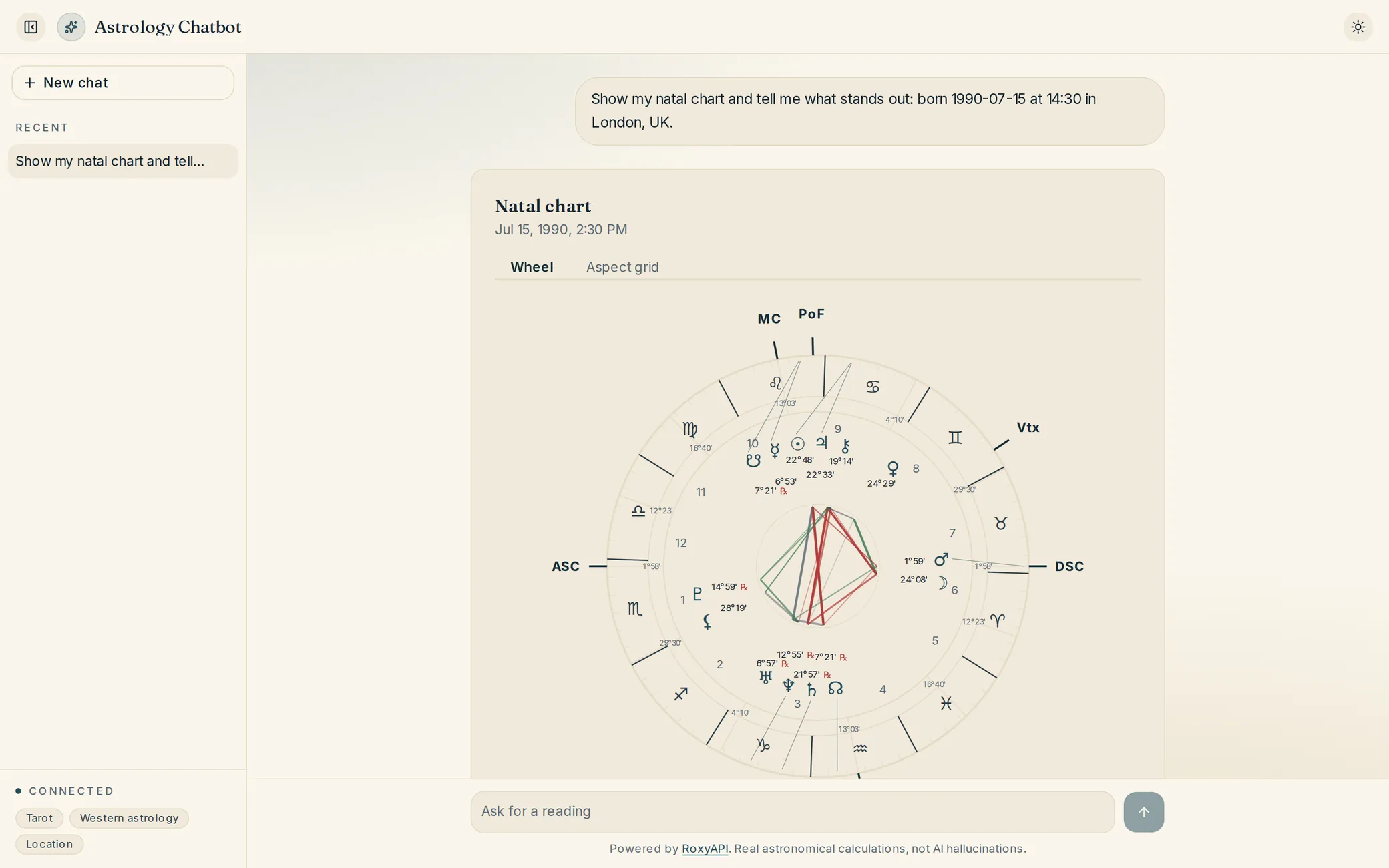
Ship a chatbot that answers "what is my Life Path", "draw me a tarot card", "what is my Human Design type", "what is my kundli" using real RoxyAPI data. Time to ship: 30 to 45 minutes.
The flagship RoxyAPI build. A user types a natural-language question. An LLM picks the right RoxyAPI tool, calls it, and replies in plain English. The LLM does endpoint selection, field extraction, and interpretation synthesis. You write no question-to-endpoint mapping.
MCP (Model Context Protocol) is the fast path. Register RoxyAPI once, every RoxyAPI endpoint becomes a tool the model can auto-discover. The slower path is raw function calling, where you hand-define each tool. Both are covered below.
What you can build
Daily horoscope bot ("what is the Leo horoscope today")
Natal chart bot ("I was born July 15 1990 at 2:30 PM in New York, what is my chart")
Human Design coach ("what is my type, strategy, authority")
Daily forecast tracker ("what transits do I have this week")
Tarot reader ("pull me a card", "do a three-card spread")
Numerology assistant ("what is my Life Path for July 15 1990")
Vedic kundli bot ("generate the kundli for someone born July 15 1990 in London")
KP horary oracle ("when will my house sell, ruling planets now")
Multi-domain wellness companion covering every domain in the RoxyAPI catalog
Node.js 18+ or Bun (for the from-scratch path) or any MCP-compatible client (for the MCP path).
Option A: clone the flagship template
The fastest path. The MIT-licensed reference integration the RoxyAPI team maintains, browse it at /templates/astrology-ai-chatbot.
bash
git clone https://github.com/RoxyAPI/astrology-ai-chatbot.git
cd astrology-ai-chatbot
npm install
Create .env.local:
Code
ROXY_API_KEY=your_roxy_key
ANTHROPIC_API_KEY=your_claude_key
# or OPENAI_API_KEY / GOOGLE_GENERATIVE_AI_API_KEY
Run:
bash
npm run dev
Open http://localhost:3000. The template ships with a web UI, conversation history, multi-provider LLM support, and auto-discovery of every RoxyAPI MCP server (astrology, vedic-astrology, forecast, human-design, chinese-astrology, feng-shui, mesoamerican-astrology, vastu, numerology, kabbalah, tarot, biorhythm, ayurveda, iching, crystals, dreams, angel-numbers, location). You do not define tools. The Vercel AI SDK picks them up from the remote MCP manifest.
Option B: build it from scratch with function calling
If you want to see the machinery, here is a single-file chatbot that hand-defines four tools and hand-calls RoxyAPI via the SDK.
import Anthropic from '@anthropic-ai/sdk';
import { createRoxy } from '@roxyapi/sdk';
import { createInterface } from 'node:readline';

const client = new Anthropic();
const roxy = createRoxy(process.env.ROXY_API_KEY!);

const tools = [
  {
    name: 'get_daily_horoscope',
    description: 'Daily horoscope for a zodiac sign. Returns overview, love, career, health, finance.',
    input_schema: {
      type: 'object',
      properties: { sign: { type: 'string', description: 'Lowercase sign, aries through pisces' } },
      required: ['sign'],
    },
  },
  {
    name: 'generate_natal_chart',
    description: 'Western natal chart from birth data. Returns planets with interpretation, houses, aspects.',
    input_schema: {
      type: 'object',
      properties: {
        date: { type: 'string', description: 'YYYY-MM-DD' },
        time: { type: 'string', description: 'HH:MM:SS' },
        latitude: { type: 'number' },
        longitude: { type: 'number' },
        timezone: { type: 'string', description: 'IANA id, e.g. America/New_York' },
      },
      required: ['date', 'time', 'latitude', 'longitude', 'timezone'],
    },
  },
  {
    name: 'generate_bodygraph',
    description: 'Human Design bodygraph. Returns type (Manifestor, Generator, Manifesting Generator, Projector, Reflector), strategy, authority, profile, defined centers, channels, gates, incarnation cross.',
    input_schema: {
      type: 'object',
      properties: {
        date: { type: 'string' },
        time: { type: 'string' },
        timezone: { type: 'string' },
        latitude: { type: 'number' },
        longitude: { type: 'number' },
      },
      required: ['date', 'time', 'timezone'],
    },
  },
  {
    name: 'generate_forecast_timeline',
    description: 'Forecast timeline of significant astrological events (transit aspects, sign ingresses, retrograde stations, dasha changes, biorhythm critical days) between two dates for one user.',
    input_schema: {
      type: 'object',
      properties: {
        birthData: {
          type: 'object',
          properties: {
            date: { type: 'string' },
            time: { type: 'string' },
            timezone: { type: 'string' },
          },
          required: ['date', 'time', 'timezone'],
        },
        startDate: { type: 'string', description: 'YYYY-MM-DD' },
        endDate: { type: 'string', description: 'YYYY-MM-DD' },
      },
      required: ['birthData'],
    },
  },
  {
    name: 'calculate_life_path',
    description: 'Numerology Life Path number from birth date.',
    input_schema: {
      type: 'object',
      properties: {
        year: { type: 'number' },
        month: { type: 'number' },
        day: { type: 'number' },
      },
      required: ['year', 'month', 'day'],
    },
  },
  {
    name: 'get_daily_tarot_card',
    description: 'Draw a single tarot card with interpretation.',
    input_schema: { type: 'object', properties: { seed: { type: 'string' } } },
  },
];

async function callRoxy(name: string, input: any) {
  if (name === 'get_daily_horoscope') {
    const { data, error } = await roxy.astrology.getDailyHoroscope({ path: { sign: input.sign } });
    if (error) throw error;
    return data;
  }
  if (name === 'generate_natal_chart') {
    const { data, error } = await roxy.astrology.generateNatalChart({ body: input });
    if (error) throw error;
    return data;
  }
  if (name === 'generate_bodygraph') {
    const { data, error } = await roxy.humanDesign.generateBodygraph({ body: input });
    if (error) throw error;
    return data;
  }
  if (name === 'generate_forecast_timeline') {
    const { data, error } = await roxy.forecast.generateTimeline({ body: input });
    if (error) throw error;
    return data;
  }
  if (name === 'calculate_life_path') {
    const { data, error } = await roxy.numerology.calculateLifePath({ body: input });
    if (error) throw error;
    return data;
  }
  if (name === 'get_daily_tarot_card') {
    const { data, error } = await roxy.tarot.getDailyCard({ body: input });
    if (error) throw error;
    return data;
  }
  throw new Error('unknown tool');
}

async function chat(history: any[]) {
  let response = await client.messages.create({
    model: 'claude-sonnet-5-5',
    max_tokens: 1024,
    system: 'You are a friendly spiritual assistant. Always call a tool when the user asks for horoscope, birth chart, Human Design, forecast, tarot, or numerology data. Never guess. For any chart question, geocode the city first if you only have a name.',
    tools,
    messages: history,
  });

  while (response.stop_reason === 'tool_use') {
    const tu = response.content.find((b: any) => b.type === 'tool_use') as any;
    const result = await callRoxy(tu.name, tu.input);
    history.push({ role: 'assistant', content: response.content });
    history.push({
      role: 'user',
      content: [{ type: 'tool_result', tool_use_id: tu.id, content: JSON.stringify(result) }],
    });
    response = await client.messages.create({
      model: 'claude-sonnet-5-5',
      max_tokens: 1024,
      tools,
      messages: history,
    });
  }

  const text = (response.content.find((b: any) => b.type === 'text') as any)?.text ?? '';
  history.push({ role: 'assistant', content: response.content });
  return text;
}

const rl = createInterface({ input: process.stdin, output: process.stdout });
const history: any[] = [];
console.log('RoxyAPI chatbot. Type quit to exit.\n');
const loop = () => rl.question('You: ', async (line) => {
  if (line.trim().toLowerCase() === 'quit') return rl.close();
  history.push({ role: 'user', content: line });
  const reply = await chat(history);
  console.log('\nBot: ' + reply + '\n');
  loop();
});
loop();
Run:
bash
ROXY_API_KEY=your_roxy_key ANTHROPIC_API_KEY=your_claude_key bun chat.ts
Try:
"What is the Leo horoscope today?"
"I was born July 15 1990 at 2:30 PM in New York, what is my Human Design type?"
"Show me my forecast for the next 30 days."
"Draw me a tarot card."
"What is my Life Path? Birthday July 15 1990."
python
# chat.py, same idea with the Python SDK
import os
import anthropic
from roxy_sdk import create_roxy

client = anthropic.Anthropic()
roxy = create_roxy(os.environ['ROXY_API_KEY'])

def call_roxy(name, args):
    if name == 'get_daily_horoscope':
        return roxy.astrology.get_daily_horoscope(sign=args['sign'])
    if name == 'generate_natal_chart':
        return roxy.astrology.generate_natal_chart(**args)
    if name == 'generate_bodygraph':
        return roxy.human_design.generate_bodygraph(**args)
    if name == 'generate_timeline':
        return roxy.forecast.generate_timeline(**args)
    if name == 'calculate_life_path':
        return roxy.numerology.calculate_life_path(**args)
    if name == 'get_daily_tarot_card':
        return roxy.tarot.get_daily_card(**args)
    raise ValueError('unknown tool')
php
<?php

use function RoxyAPI\Sdk\createRoxy;

$roxy = createRoxy(getenv('ROXY_API_KEY'));

function callRoxy($roxy, $name, $args) {
    if ($name === 'get_daily_horoscope') {
        return $roxy->astrology->getDailyHoroscope(sign: $args['sign']);
    }
    if ($name === 'generate_natal_chart') {
        return $roxy->astrology->generateNatalChart(...$args);
    }
    if ($name === 'generate_bodygraph') {
        return $roxy->humanDesign->generateBodygraph(...$args);
    }
    if ($name === 'generate_timeline') {
        return $roxy->forecast->generateTimeline(...$args);
    }
    throw new Exception('unknown tool');
}
Option C: skip tool definitions with MCP
Neither of the above scales. The moment you want "all 18+ domains, every endpoint" you stop hand-writing tool schemas and point the LLM at MCP.
Register all RoxyAPI MCP servers with Claude Code in one go:
bash
claude mcp add-json --scope user roxy-astrology     '{"type":"http","url":"https://roxyapi.com/mcp/astrology","headers":{"X-API-Key":"YOUR_KEY"}}'
claude mcp add-json --scope user roxy-vedic         '{"type":"http","url":"https://roxyapi.com/mcp/vedic-astrology","headers":{"X-API-Key":"YOUR_KEY"}}'
claude mcp add-json --scope user roxy-numerology    '{"type":"http","url":"https://roxyapi.com/mcp/numerology","headers":{"X-API-Key":"YOUR_KEY"}}'
claude mcp add-json --scope user roxy-tarot         '{"type":"http","url":"https://roxyapi.com/mcp/tarot","headers":{"X-API-Key":"YOUR_KEY"}}'
claude mcp add-json --scope user roxy-iching        '{"type":"http","url":"https://roxyapi.com/mcp/iching","headers":{"X-API-Key":"YOUR_KEY"}}'
claude mcp add-json --scope user roxy-biorhythm     '{"type":"http","url":"https://roxyapi.com/mcp/biorhythm","headers":{"X-API-Key":"YOUR_KEY"}}'
claude mcp add-json --scope user roxy-dreams        '{"type":"http","url":"https://roxyapi.com/mcp/dreams","headers":{"X-API-Key":"YOUR_KEY"}}'
claude mcp add-json --scope user roxy-crystals      '{"type":"http","url":"https://roxyapi.com/mcp/crystals","headers":{"X-API-Key":"YOUR_KEY"}}'
claude mcp add-json --scope user roxy-angel         '{"type":"http","url":"https://roxyapi.com/mcp/angel-numbers","headers":{"X-API-Key":"YOUR_KEY"}}'
claude mcp add-json --scope user roxy-human-design  '{"type":"http","url":"https://roxyapi.com/mcp/human-design","headers":{"X-API-Key":"YOUR_KEY"}}'
claude mcp add-json --scope user roxy-forecast      '{"type":"http","url":"https://roxyapi.com/mcp/forecast","headers":{"X-API-Key":"YOUR_KEY"}}'
claude mcp add-json --scope user roxy-location      '{"type":"http","url":"https://roxyapi.com/mcp/location","headers":{"X-API-Key":"YOUR_KEY"}}'
Cursor, Antigravity and the Vercel AI SDK take the same URL and header. Claude Desktop installs the one-click desktop extension instead. See the MCP setup docs for full client instructions.
Render the result (optional)
A tool result is the same JSON the <roxy-*> components take, so componentForTool(toolName) picks the right one and setting data draws the wheel, the spread, or the bodygraph beside the reply. The whole pattern, for the Vercel AI SDK and for the Anthropic, OpenAI, and Gemini connectors, is the AI chat widgets tutorial.
Ready-made template
Browse /templates/astrology-ai-chatbot for the deploy-ready Next.js build. Same idea as Option A above with the full UI, conversation persistence, and multi-MCP discovery.
Want the chatbot to remember each user across sessions? The AI Spiritual Companion template is the same conversational core with accounts and a memory layer: semantic recall over every stored reading, on your own Supabase, with the natal chart computed once and kept. The pattern is walked step by step in the AI companion with memory tutorial.
Gotchas
Do not embed the RoxyAPI key in the browser. The chatbot backend holds the secret key and proxies calls. Anyone can view page source.
Timezone accepts IANA strings. The LLM naturally fills "America/New_York" from "New York"; let it. The server resolves DST for the birth date automatically. Decimal offsets like -5 also work but do not DST-correct.
Tell the model to geocode for chart calls. Add a line to the system prompt: "For any birth chart or Human Design question, call location search first to get latitude, longitude, and timezone." Without that, the LLM sometimes invents coordinates.
Seeded endpoints are deterministic. Pass seed: userId to daily tarot and the same user gets the same card all day. That is a feature, not a cache staleness bug.
Forecast endpoints accept birthData as a nested object. Not flat. Easy to flatten by mistake.
Gemini tool schemas use Type enums. See the function-calling guide for the Gemini variant.
What to build next
The MCP setup docs cover Claude Desktop, Cursor, Antigravity, and custom Streamable HTTP clients.
The function-calling guide shows the raw tool-calling pattern for OpenAI, Anthropic, and Gemini.
The personalized tracker tutorial shows the full server-side build for HD + forecast + numerology in a single dashboard.
The templates page lists the full catalog of clone-and-ship apps.
R
RosieYour AI guide to RoxyAPI
R
Hi, I am Rosie, your guide to the RoxyAPI insight tools.
Ask me to read your birth chart, pull a card, or map your numbers, and I will interpret what it means for you. Unlike most AIs, I never make the numbers up: every reading runs on real, verified calculations. Curious about the API, pricing, or docs instead? Ask me that too.