- Docs
- What To Build
- AI Companion with Memory
Build an AI astrology companion with memory
RoxyAPI is stateless on purpose. This tutorial shows how to add per-user memory, chart context, reading history, and semantic recall, on your own stack, so your users data never leaves your control.
The thing that turns a horoscope toy into a companion users return to is memory: it remembers their chart, what it told them last week, and how they reacted. RoxyAPI deliberately stores none of that. It computes from the inputs you send and returns a result. The memory layer is yours to build, which is exactly what keeps you in control of personalization and privacy. This tutorial wires a simple but real memory layer around stateless RoxyAPI calls.
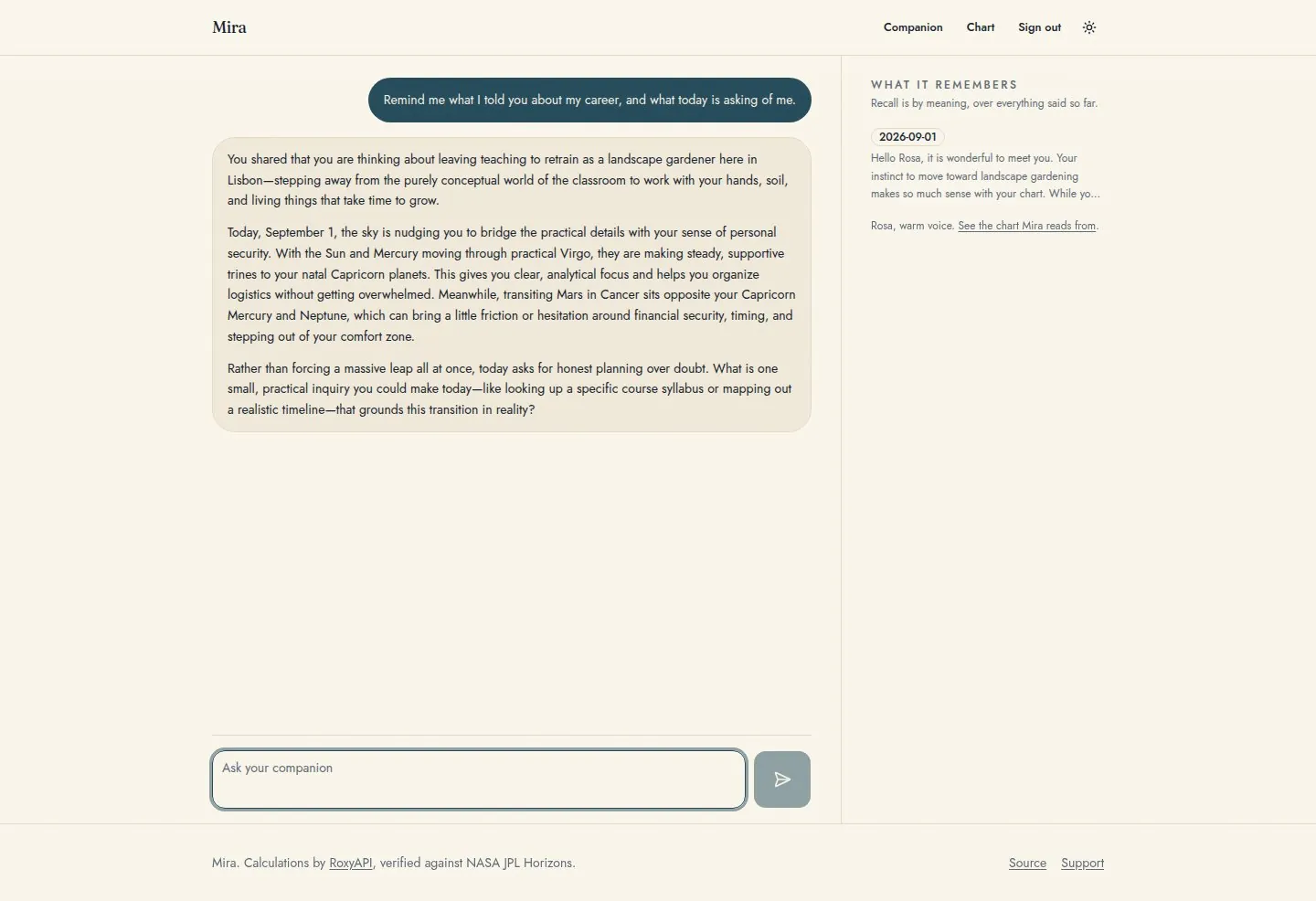
Quick start: clone it instead of building it. Everything this tutorial builds ships as a free MIT template. The AI Spiritual Companion is the reference implementation on Next.js and Supabase: semantic recall, the full reading history, accounts, a guided onboarding, and the exactly once chart cache, already wired and tested. White label it, add your own paid tier, and ship under your own name. The license asks nothing back, and you start hundreds of hours ahead. Read on to understand the pattern you are shipping, or to build it on a different stack.
The principle: stateless calc, stateful you
Keep a clean separation. RoxyAPI answers "what are the facts for this birth data and date" deterministically. Your store answers "who is this user and what have we said before." The companion is the join of the two at request time.
| Layer | Owner | Holds |
|---|---|---|
| Calculation | RoxyAPI (stateless) | charts, transits, numerology, panchang, bodygraph, forecast |
| Identity and memory | Your database | user, birth data, preferences |
| Reading history | Your database | every reading you have shown |
| Semantic recall | Your vector store | embeddings of past readings and chat |
Prerequisites
- A RoxyAPI key. Get your API key.
- An LLM key for the conversational layer (Anthropic, OpenAI, Gemini).
- A database and, optionally, a vector index for semantic recall. Any Postgres, SQLite, or KV store works. The reference choice, and what the template ships, is Supabase: one service covers accounts, Postgres, the pgvector index, and row level security, so every row is keyed to the signed in user from day one.
The fastest starting point is the AI Spiritual Companion template, which ships every step below already wired. The chatbot template is the same conversational shape without accounts or memory.
Install
npm install @roxyapi/sdkPython, PHP, and C# SDKs follow the same shape:
pip install roxy-sdk
composer require roxyapi/sdk
dotnet add package RoxyApi.Sdk
Step 1: store the chart once
Birth data is immutable, so compute the natal chart a single time and persist it. Every later turn reads it from your store, never the API. Method names verified against the live OpenAPI spec.
import { createRoxy } from '@roxyapi/sdk';

const roxy = createRoxy(process.env.ROXY_API_KEY!);

type BirthData = {
  date: string;       // YYYY-MM-DD
  time: string;       // HH:MM:SS
  latitude: number;
  longitude: number;
  timezone: string;   // IANA, e.g. "America/New_York"
};

async function ensureChart(userId: string, birth: BirthData) {
  const cached = await db.charts.find(userId);
  if (cached) return cached;

  const { data: chart } = await roxy.astrology.generateNatalChart({ body: birth });
  await db.charts.save(userId, chart); // one billable call, ever
  return chart;
}
This is the same caching idea as in the caching guide, scoped to a user.
Geocode the user city once via GET /location/search and persist the lat/lng/timezone alongside the chart. Never ask the user to type coordinates.
Step 2: persist reading history
Every reading you show, save it with a timestamp. This is what lets the companion say "last month your focus was career, this month it shifts to relationships."
await db.readings.append(userId, {
  date: today,
  kind: 'daily-horoscope',
  data: horoscope,        // the structured RoxyAPI response
  shown: renderedText,    // what the user actually saw
});
Step 3: add semantic recall
For a companion that remembers themes, not just rows, embed each reading and store the vector. At request time, embed the user current message and pull the few most similar past readings to ground the reply.
const vector = await embed(renderedText);
await vectors.upsert({ id, userId, vector, meta: { date: today } });

// later, on a new question
const recent = await vectors.query(await embed(userMessage), {
  filter: { userId },
  topK: 4,
});
vector = embed(rendered_text)
store.upsert(id=id, vector=vector, metadata={'user_id': user_id, 'date': today})
# later
recent = store.query(embed(user_message), filter={'user_id': user_id}, top_k=4)Step 4: assemble context and reply
On each turn, gather the stored chart, the relevant past readings, and any live calculation you need, then hand all of it to your LLM as grounded context. RoxyAPI supplies fresh facts (today transits, a new tarot pull, today bodygraph activation); your store supplies continuity. Grounding the model on these verified facts, instead of letting it compute them, is what keeps it from inventing charts: see why AI chatbots hallucinate birth charts.
const chart  = await ensureChart(userId, birth);                       // from your store
const memory = await recallReadings(userId, userMessage);              // from your store
const { data: today } = await roxy.astrology.calculateTransits({       // live, stateless
  body: { natalChart: birth },                                         // the BIRTH DATA, not the chart response
});

const reply = await llm.complete({
  system: 'You are a warm astrology companion. Ground every claim in the data.',
  context: { chart, memory, today },
  message: userMessage,
});
natalChart on POST /astrology/transits takes the birth data (date, time, latitude, longitude, timezone), not the chart response from Step 1. Passing the generated chart returns 400 validation_error. Keep sending the same immutable birth object you cached the chart with. The response carries transitAspects[] with transitPlanet, natalPlanet, type, orb, isApplying, and strength.
The template performs the live half of this step over Remote MCP instead of hand picking SDK calls: the model discovers the calculation tools, calls exactly what the question needs, and every call requests the compact response shape for lower inference cost per turn. The SDK assembly above remains the right shape when the app, not the model, should decide what gets computed. Both paths ground the reply the same way.
Render the result (optional)
If you want a visual layer in addition to the chat reply, drop <roxy-natal-chart> from @roxyapi/ui into your client. Pass the cached chart from Step 1 once, the wheel renders client-side without re-fetching.
<script src="https://cdn.jsdelivr.net/npm/@roxyapi/ui@0/dist/cdn/roxy-ui.js" defer></script>
<roxy-natal-chart id="chart"></roxy-natal-chart>
<script type="module">
  document.getElementById('chart').data = chartFromYourServer;
</script>
Keep it private by design
Send the API only what a calculation needs (date, time, coordinates, a name for numerology). Do not pass journal entries, mood logs, or chat history to RoxyAPI. Those belong in your store. The API is stateless and keeps nothing, and your memory layer should be the only place sensitive user content lives.
Ready-made template
This tutorial is runnable as a complete template: ai-spiritual-companion ships the whole memory pattern described above, built on Next.js 16, Supabase (Auth, Postgres, pgvector with row level security), and the Vercel AI SDK, MIT licensed. The natal chart is cached exactly once per user, every reading is stored, semantic recall runs on pgvector, and live readings are grounded over Remote MCP. See it in the template catalog.
git clone https://github.com/RoxyAPI/ai-spiritual-companion
cd ai-spiritual-companion
npm install
npx supabase start
cp .env.example .env.local   # then fill in the keys, each one is commented
npm run dev
Prefer a stateless chat without accounts or memory? The astrology-ai-chatbot template is the same conversational core with no database: Remote MCP across all 18 RoxyAPI domains, multi-LLM, MIT licensed.
FAQ
Does RoxyAPI store conversation or user memory?
No. The API is stateless and keeps no birth data, history, or profiles. All memory lives in your own database and vector store, which keeps you in control of privacy.
Where should per-user memory live?
In your stack: a database for identity, birth data, and reading history, and optionally a vector store for semantic recall. RoxyAPI supplies the calculations; your store supplies continuity.
How do I avoid recomputing a user chart on every message?
Compute the natal chart once from the immutable birth data and persist it, then read it from your store on later turns. Only live, time-dependent calls (current transits, today bodygraph activation, today forecast events) hit the API again.
Can I build a companion without a vector store?
Yes. A database of reading history with timestamps is enough for a strong companion. A vector store adds semantic recall of themes, which is an upgrade, not a requirement.
Next steps
Reduce repeat calls with caching, keep your interpretation layer yours with the calculation engine guide, build a personalized dashboard with the personalized tracker tutorial, and ship from the AI Spiritual Companion template.