Human Design Compatibility API
Two-person composite bodygraph compatibility
Included with every plan (at no extra cost)
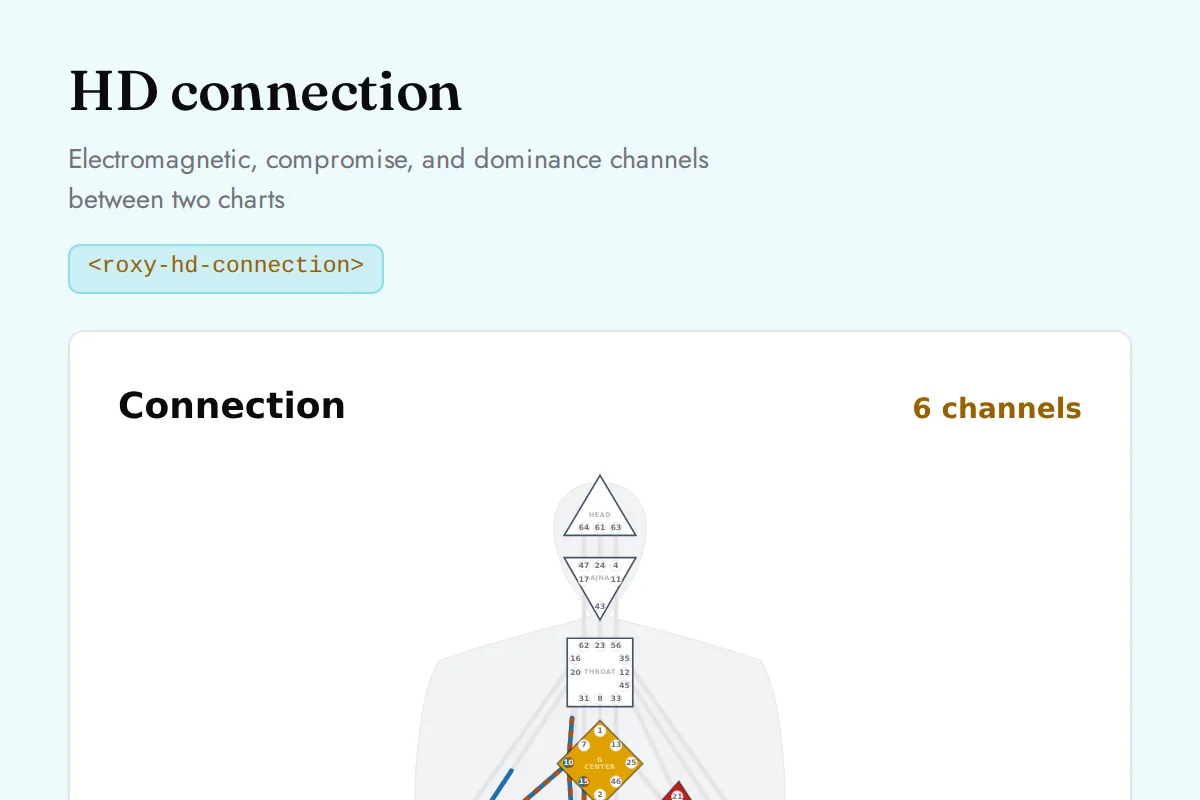
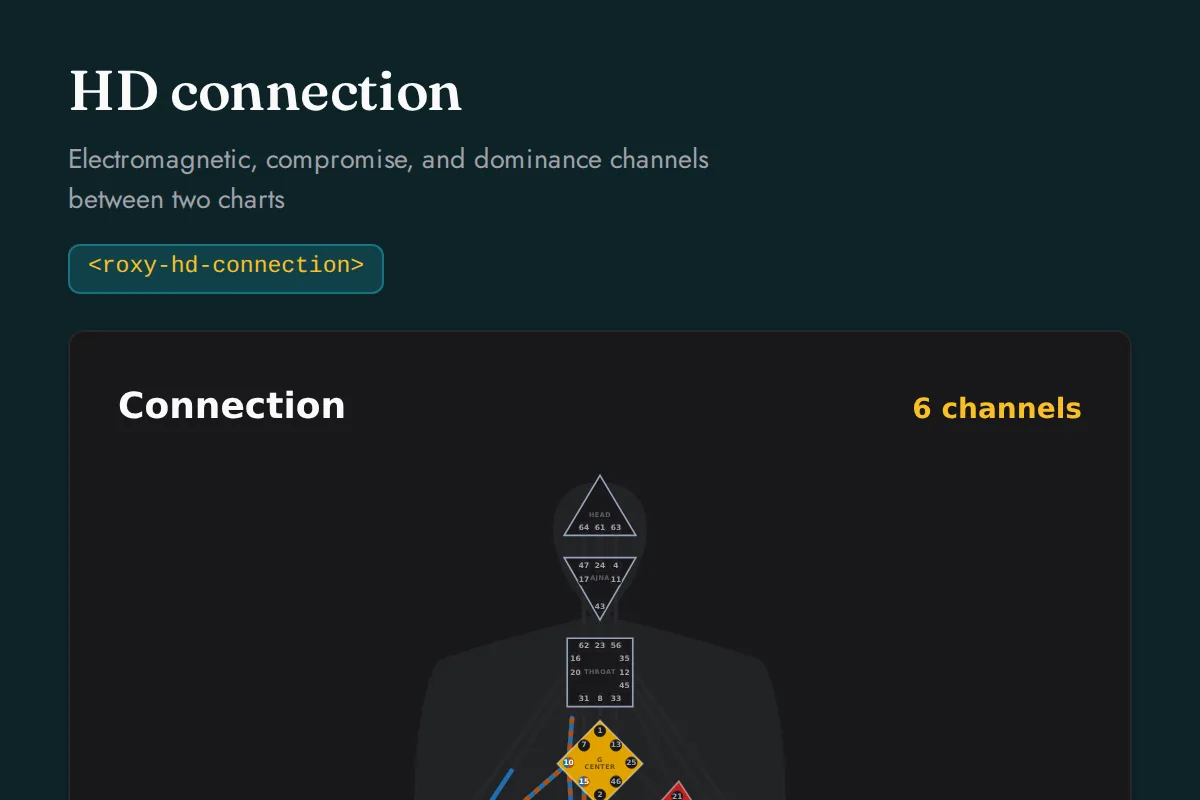
Calculate a Human Design connection chart by overlaying two bodygraphs. For each of the 36 channels the dynamic between the two people is classified as electromagnetic, dominance, compromise, or companionship, the four mechanics of how two designs meet. Also returns the nine centers as defined or open in the combined bodygraph with which person defines each, the combined definition, and a count of each dynamic. Built for relationship, dating, and coaching tools.
Location first, chart second
The Human Design Compatibility API needs latitude, longitude, and timezone. Never ask users to type coordinates. Resolve a city with the Location endpoint first, then feed the result into the request. Timezone accepts a decimal offset or an IANA name.
1 Resolve the location
curl "https://roxyapi.com/api/v2/location/search?q=New York" \
  -H "X-API-Key: YOUR_KEY"
# -> cities[0]: { latitude, longitude, timezone: "America/New_York" }
2 Call the Human Design Compatibility endpoint
# feed latitude, longitude and timezone from step 1
POST https://roxyapi.com/api/v2/human-design/connection
Request
POST /api/v2/human-design/connection
Parameters
| Parameter | Type | Description |
|---|---|---|
| langquery | string enum | Response language (BCP 47). Supported: en, tr, de, es, hi, pt, fr, ru, zh-Hans, zh-Hant. Defaults to en. Coverage varies by domain, and a field with no translation in the requested language returns English. Default en. |
Request body
| Field | Type | Description |
|---|---|---|
| personA* | object | Birth moment of the first person in the connection. |
| personA.date* | string (date) | Birth date in YYYY-MM-DD format. The anchor for both the Personality activations at birth and the Design activations 88 degrees of solar arc earlier. |
| personA.time* | string (time) | Birth time in 24-hour HH:MM:SS format. Precision matters: the profile lines and gate boundaries shift with the exact minute of birth. |
| personA.timezone* | number or string | IANA name (e.g. "America/New_York", "Europe/London", "UTC"), decimal hours (e.g. -5 for EST, 1 for CET), or a fixed UTC offset (e.g. "-05:00", "+01:00"). Prefer the IANA name: it is resolved to the offset in force at the birth date and time, historical daylight-saving rules included, while a fixed offset or decimal is taken literally and will be wrong if it does not match the daylight-saving state at that moment. On a transition day a time in the repeated hour is read as its first occurrence and a time in the skipped hour is moved forward past the gap. Invalid timezones return 400 with a validation error. |
| personA.latitude | number | Birth latitude in decimal degrees. Optional and does not affect the bodygraph, which depends only on ecliptic longitudes. Defaults to 0. |
| personA.longitude | number | Birth longitude in decimal degrees. Optional and does not affect the bodygraph. Defaults to 0. |
| personA.nodeType | string enum | Lunar node convention. "mean" is the smoothed average node, which always moves retrograde; "true" is the osculating node, which tracks the real perturbed node, oscillates up to about 1.5 degrees either side of the mean on a 173-day cycle, and can briefly turn direct. Neither is more correct and they almost always fall in the same sign. Applies to the North and South Node activations. True is what professional Human Design software uses (HumanDesign.ai, Total Human Design) and is the value RoxyAPI verifies against, so leave it unset for a standard chart. It matters only when a node sits on a gate boundary, where the choice moves a node gate. Because a gate can be half of a channel, that can change the completed channels and, with them, whether a center reads defined or open, plus the definition, authority, profile or type. A chart where only one center disagrees is the usual shape, since the type and profile often survive unchanged. If another calculator disagrees on any of those, it is almost certainly using the mean node: pass "mean" to match it. Defaults to "true". |
| personB* | object | Birth moment of the second person in the connection. |
| personB.date* | string (date) | Birth date in YYYY-MM-DD format. The anchor for both the Personality activations at birth and the Design activations 88 degrees of solar arc earlier. |
| personB.time* | string (time) | Birth time in 24-hour HH:MM:SS format. Precision matters: the profile lines and gate boundaries shift with the exact minute of birth. |
| personB.timezone* | number or string | IANA name (e.g. "America/New_York", "Europe/London", "UTC"), decimal hours (e.g. -5 for EST, 1 for CET), or a fixed UTC offset (e.g. "-05:00", "+01:00"). Prefer the IANA name: it is resolved to the offset in force at the birth date and time, historical daylight-saving rules included, while a fixed offset or decimal is taken literally and will be wrong if it does not match the daylight-saving state at that moment. On a transition day a time in the repeated hour is read as its first occurrence and a time in the skipped hour is moved forward past the gap. Invalid timezones return 400 with a validation error. |
| personB.latitude | number | Birth latitude in decimal degrees. Optional and does not affect the bodygraph, which depends only on ecliptic longitudes. Defaults to 0. |
| personB.longitude | number | Birth longitude in decimal degrees. Optional and does not affect the bodygraph. Defaults to 0. |
| personB.nodeType | string enum | Lunar node convention. "mean" is the smoothed average node, which always moves retrograde; "true" is the osculating node, which tracks the real perturbed node, oscillates up to about 1.5 degrees either side of the mean on a 173-day cycle, and can briefly turn direct. Neither is more correct and they almost always fall in the same sign. Applies to the North and South Node activations. True is what professional Human Design software uses (HumanDesign.ai, Total Human Design) and is the value RoxyAPI verifies against, so leave it unset for a standard chart. It matters only when a node sits on a gate boundary, where the choice moves a node gate. Because a gate can be half of a channel, that can change the completed channels and, with them, whether a center reads defined or open, plus the definition, authority, profile or type. A chart where only one center disagrees is the usual shape, since the type and profile often survive unchanged. If another calculator disagrees on any of those, it is almost certainly using the mean node: pass "mean" to match it. Defaults to "true". |
Example request
{
  "personA": {
    "date": "1990-07-15",
    "time": "13:00:00",
    "timezone": "America/New_York",
    "latitude": 0,
    "longitude": 0,
    "nodeType": "true"
  },
  "personB": {
    "date": "1990-07-15",
    "time": "13:00:00",
    "timezone": "America/New_York",
    "latitude": 0,
    "longitude": 0,
    "nodeType": "true"
  }
}
Response
Structured JSON with documented fields, covered by 13,405 automated tests per deploy, 3,620 of them gold-standard tests verified against NASA JPL Horizons. Not hallucinated text.
{
  "totalChannels": 2,
  "channels": [
    {
      "gateA": 7,
      "gateB": 31,
      "name": "The Alpha",
      "circuit": "Collective",
      "centers": [
        "g",
        "throat"
      ],
      "dynamic": "Companionship",
      "personAGates": [
        7,
        31
      ],
      "personBGates": [
        7,
        31
      ]
    },
    {
      "gateA": 41,
      "gateB": 30,
      "name": "Recognition",
      "circuit": "Collective",
      "centers": [
        "root",
        "solar-plexus"
      ],
      "dynamic": "Companionship",
      "personAGates": [
        41,
        30
      ],
      "personBGates": [
        41,
        30
      ]
    }
  ],
  "centers": [
    {
      "id": "head",
      "name": "Head",
      "defined": false,
      "definedBy": []
    },
    {
      "id": "ajna",
      "name": "Ajna",
      "defined": false,
      "definedBy": []
    },
    {
      "id": "throat",
      "name": "Throat",
      "defined": true,
      "definedBy": [
        "A",
        "B"
      ]
    },
    {
      "id": "g",
      "name": "G Center",
      "defined": true,
      "definedBy": [
        "A",
        "B"
      ]
    },
    {
      "id": "heart",
      "name": "Heart",
      "defined": false,
      "definedBy": []
    },
    {
      "id": "sacral",
      "name": "Sacral",
      "defined": false,
      "definedBy": []
    },
    {
      "id": "solar-plexus",
      "name": "Solar Plexus",
      "defined": true,
      "definedBy": [
        "A",
        "B"
      ]
    },
    {
      "id": "spleen",
      "name": "Spleen",
      "defined": false,
      "definedBy": []
    },
    {
      "id": "root",
      "name": "Root",
      "defined": true,
      "definedBy": [
        "A",
        "B"
      ]
    }
  ],
  "combinedDefinition": "Split",
  "summary": {
    "electromagnetic": 0,
    "dominance": 0,
    "compromise": 0,
    "companionship": 2
  }
}
Response fields
| Field | Type | Description |
|---|---|---|
| totalChannels* | number | Total number of connected channels between the two people. Equals the length of channels and the sum of the summary counts. |
| channels* | array of object | Every connected channel between the two people with its dynamic. A channel is connected when the two people together hold both of its gates. |
| channels[].gateA* | number | First gate of the channel. |
| channels[].gateB* | number | Second gate of the channel. |
| channels[].name* | string | Name of the channel whose connection dynamic is reported. Always English, whatever the lang parameter says. Use nameLocalized for anything a reader sees. |
| channels[].nameLocalized | string | Channel name in the requested language, for display only. Present only when lang is set to a language other than English, since in English it would repeat its canonical partner field exactly. Never compare against this value, compare against the canonical field beside it. |
| channels[].circuit* | string | Circuit family of the channel. One of Individual, Collective, Tribal. Always English, whatever the lang parameter says. Use circuitLocalized for anything a reader sees. |
| channels[].circuitLocalized | string | Circuit family name in the requested language, for display only. Present only when lang is set to a language other than English, since in English it would repeat its canonical partner field exactly. Never compare against this value, compare against the canonical field beside it. |
| channels[].centers* | array of string | The two centers this channel connects in the bodygraph. |
| channels[].dynamic* | string | Connection dynamic for this channel. Electromagnetic means each person holds one of the two gates and the channel completes only together, the classic point of attraction. Dominance means one person holds both gates and the other holds neither, a one-way conditioning. Compromise means one person holds both gates and the other holds a single hanging gate. Companionship means both people independently hold both gates, a shared and familiar frequency. Always English, whatever the lang parameter says, so it stays safe to compare against in code. Use dynamicLocalized for anything a reader sees. |
| channels[].dynamicLocalized | string | Connection dynamic name in the requested language, for display only. Present only when lang is set to a language other than English, since in English it would repeat its canonical partner field exactly. Never compare against this value, compare against the canonical field beside it. |
| channels[].personAGates* | array of number | Which of the channel two gates person A holds, from one to both. |
| channels[].personBGates* | array of number | Which of the channel two gates person B holds, from one to both. |
| centers* | array of object | All nine centers with their defined state in the combined connection bodygraph and which person defines each. |
Show all fieldsShow fewer fields
| Field | Type | Description |
|---|---|---|
| centers[].id* | string | Center identifier. One of head, ajna, throat, g, heart, sacral, solar-plexus, spleen, root. |
| centers[].name* | string | Display name of the center. Always English, whatever the lang parameter says. Use nameLocalized for anything a reader sees. |
| centers[].nameLocalized | string | Center name in the requested language, for display only. Present only when lang is set to a language other than English, since in English it would repeat its canonical partner field exactly. Never compare against this value, compare against the canonical field beside it. |
| centers[].defined* | boolean | Whether the center is defined in the combined connection bodygraph, where a channel counts as defined when the two people together hold both of its gates. |
| centers[].definedBy* | array of string | Who defines this center in their own chart. A, B, both, or empty when the center is open in both individual charts. |
| combinedDefinition* | string | Definition of the combined connection bodygraph from connected components among its defined centers. One of None, Single, Split, Triple Split, Quadruple Split. Always English, whatever the lang parameter says, so it stays safe to compare against in code. Use combinedDefinitionLocalized for anything a reader sees. |
| combinedDefinitionLocalized | string | Combined definition name in the requested language, for display only. Present only when lang is set to a language other than English, since in English it would repeat its canonical partner field exactly. Never compare against this value, compare against the canonical field beside it. |
| summary* | object | Count of each connection dynamic across all connected channels. |
| summary.electromagnetic* | number | Count of electromagnetic channels, the points of mutual attraction. |
| summary.dominance* | number | Count of dominance channels, where one person conditions the other one way. |
| summary.compromise* | number | Count of compromise channels, a full channel meeting a single hanging gate. |
| summary.companionship* | number | Count of companionship channels, where both people share the whole channel. |
Supported options
lang
Call it in your language.
Every snippet is generated from the live OpenAPI spec, so method names, parameters, and fields always match production.
import { createRoxy } from '@roxyapi/sdk'

const roxy = createRoxy(process.env.ROXY_API_KEY!)
const { data } = await roxy.humanDesign.calculateConnection({ body: { personA: { date: '1990-07-15', time: '13:00:00', timezone: 'America/New_York', latitude: 0, longitude: 0, nodeType: 'true' }, personB: { date: '1990-07-15', time: '13:00:00', timezone: 'America/New_York', latitude: 0, longitude: 0, nodeType: 'true' } } })
Install: npm install @roxyapi/sdk
from roxy_sdk import create_roxy

roxy = create_roxy("YOUR_API_KEY")
result = roxy.human_design.calculate_connection(person_a={'date': '1990-07-15', 'time': '13:00:00', 'timezone': 'America/New_York', 'latitude': 0, 'longitude': 0, 'nodeType': 'true'}, person_b={'date': '1990-07-15', 'time': '13:00:00', 'timezone': 'America/New_York', 'latitude': 0, 'longitude': 0, 'nodeType': 'true'})
Install: pip install roxy-sdk
use function RoxyAPI\Sdk\createRoxy;

$roxy = createRoxy(getenv('ROXY_API_KEY'));
$result = $roxy->humanDesign->calculateConnection(personA: ['date' => '1990-07-15', 'time' => '13:00:00', 'timezone' => 'America/New_York', 'latitude' => 0, 'longitude' => 0, 'nodeType' => 'true'], personB: ['date' => '1990-07-15', 'time' => '13:00:00', 'timezone' => 'America/New_York', 'latitude' => 0, 'longitude' => 0, 'nodeType' => 'true']);
Install: composer require roxyapi/sdk
using RoxyApi;

var roxy = new RoxyClient(Environment.GetEnvironmentVariable("ROXY_API_KEY")!);
var result = await roxy.HumanDesign.Connection.PostAsync(new() { /* request fields above */ });
Install: dotnet add package RoxyApi.Sdk
import roxyapi "github.com/RoxyAPI/sdk-go"

roxy, _ := roxyapi.NewRoxy(os.Getenv("ROXY_API_KEY"))
resp, _ := roxy.HumanDesign.CalculateConnection(ctx, nil, roxyapi.CalculateConnectionJSONRequestBody{ /* request fields above */ })
Install: go get github.com/RoxyAPI/sdk-go
curl -X POST "https://roxyapi.com/api/v2/human-design/connection" \
  -H "X-API-Key: YOUR_KEY" \
  -H "Content-Type: application/json" \
  -d '{"personA":{"date":"1990-07-15","time":"13:00:00","timezone":"America/New_York","latitude":0,"longitude":0,"nodeType":"true"},"personB":{"date":"1990-07-15","time":"13:00:00","timezone":"America/New_York","latitude":0,"longitude":0,"nodeType":"true"}}'
Prefer to try before you write code? Run this Human Design endpoint live in the API playground and inspect a real production response.
More Human Design Compatibility endpoints
The Human Design Compatibility API bundles these related endpoints under one key.
Calculate Human Design Penta - Small-group BG5 operating system for three to five people
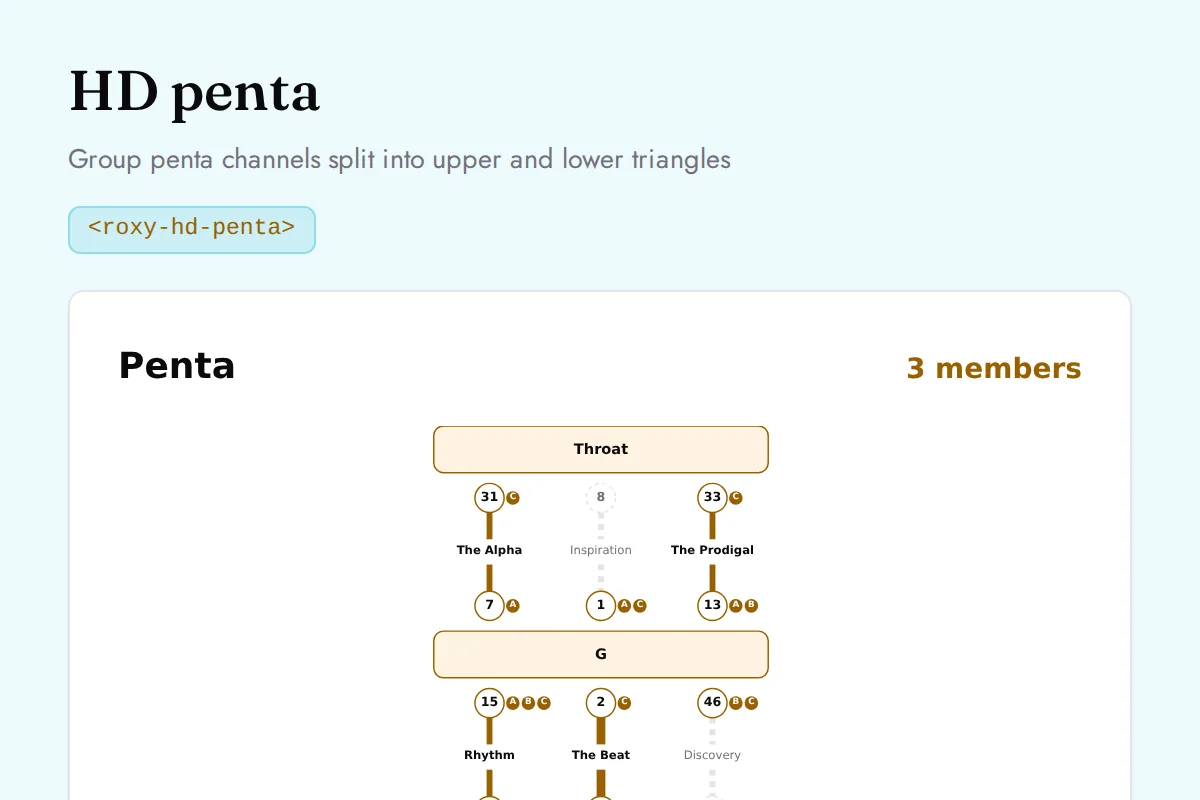
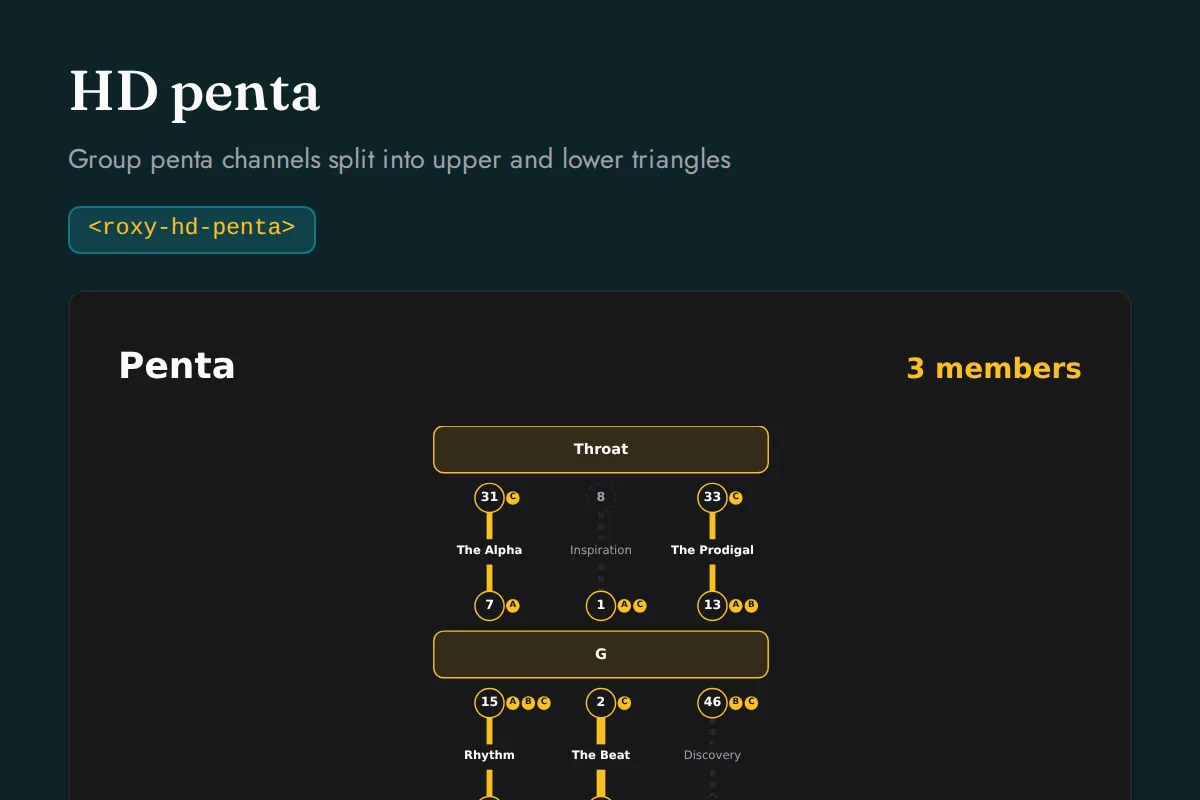
Calculate the Human Design Penta (BG5, Base Group 5) for a small group of three to five people. The Penta is a trans-auric form built from a fixed set of six channels running only between the Sacral, the G Center, and the Throat. It reports which of the twelve Penta gates are filled and by whom, which of the six channels are defined Strengths, the upper leadership channels versus the lower generative channels, the 2/14 material core, and the functional gaps where no member supplies a role. Built for team, family, and group analysis tools. Below three people no Penta forms and above five a second Penta emerges, so the group size must be three to five.
Try it liveRemote MCP for AI agents
Every Human Design endpoint is a callable tool on the Remote MCP server over Streamable HTTP. No local setup, no Docker. Claude, ChatGPT, Cursor, and any MCP client auto-discover the tools and ground their answers in verified data.
claude mcp add --transport http \
  roxy-human-design https://roxyapi.com/mcp/human-design \
  --header "X-API-Key: YOUR_KEY"
Tool name for POST /human-design/connection: post_human_design_connection. Full MCP setup guide
What you can build
Spiritual and self-discovery apps: full bodygraph generation, type and authority readings, and profile insights for personal growth journeys
Dating and relationship platforms: type, authority, and profile compatibility context derived from two birth charts
AI chatbots and coaching assistants: bodygraph data via remote MCP tool calls for Human Design conversations and decision-making guidance
Practitioner and reading tools: activation columns, defined channels, and center analysis for professional Human Design charts
Wellness and mindfulness platforms: strategy and authority prompts that help users make aligned decisions
Content and editorial platforms: gate and center reference lookups for explainer pages and structured Human Design libraries
Drop-in UI components and no-code widgets.
Render Human Design Compatibility API responses without building charts yourself. Install the npm package and drop these into Next.js, React, Vue, Svelte, Angular, or plain HTML, or embed the very same component on Squarespace, Wix, or WordPress by pasting one snippet, with no backend and no build step. They belong to one library that covers the entire spiritual stack rather than astrology alone, MIT licensed and included in every plan at no extra cost, never a separate product and never an upsell. The Human Design Compatibility API calculations, the interface that renders them, and the Remote MCP your agent calls, all behind one key, end to end.
Show all Human Design Compatibility UI componentsShow fewer Human Design Compatibility UI components
| Element | Renders |
|---|---|
| <roxy-hd-connection> | Electromagnetic, compromise, and dominance channels between two charts |
| <roxy-hd-penta> | Group penta channels split into upper and lower triangles |
Related capabilities
Human Design Compatibility API FAQ
What does the Human Design Compatibility API return?
Calculate a Human Design connection chart by overlaying two bodygraphs. Every response is structured JSON with documented fields, not free text, so you map it straight into your product.
How do I authenticate with the Human Design Compatibility API?
Pass your key in the X-API-Key header on every request. Keys are delivered instantly at checkout with no approval queue. Use a secret sk key server side, or mint a publishable pk key locked to your origins for browser and no-code use.
Does the Human Design Compatibility API support multiple languages?
Yes. Append the lang query parameter to any endpoint for responses in English, German, Spanish, French, Hindi, Portuguese, Russian and Turkish. The translated payload includes the full interpretation text, not just field labels.
Do I need coordinates to call the Human Design Compatibility API?
No. Call GET /location/search with a city name first, then pass latitude, longitude, and timezone from the first result into the request. Never ask users to type coordinates. Timezone accepts a decimal offset or an IANA name.
Is the Human Design Compatibility API available over Remote MCP for AI agents?
Yes. Every endpoint is exposed as a callable tool on the Remote MCP server at https://roxyapi.com/mcp/human-design over Streamable HTTP, so Claude, ChatGPT, Cursor, and any MCP client auto-discover it with no local setup or Docker.
How is the Human Design Compatibility API billed?
Flat pricing: 1 request equals 1 quota unit, REST and MCP identical, with no credit weighting or per-token markup. Every plan includes all 18 domains, so the Human Design Compatibility API is included at no extra cost.
Start using Human Design Compatibility API today.
A Human Design bodygraph, type and authority from a Design moment solved on the true 88 degree solar arc and printed with the chart.
All 18 domains included with every plan. Every endpoint, MCP server, SDK, and templates.
Plans from $39/mo, starting at $1.80 per domain on annual billing. No credit card required for testing.
View Pricing & Get API Key