
- Built with
- Next.js 16Vercel AI SDK v6MCPTypeScriptTailwind v4
- Powered by these APIs
One key covers all 18 domains.
- License
- MIT licensed and white label: clone it, modify it and ship it under your own brand.
Web App / Open Source30 minMIT LicenseWhite-label ready
AI Astrology Chatbot
AI chatbot with real readings across all domains. Not hallucinations.
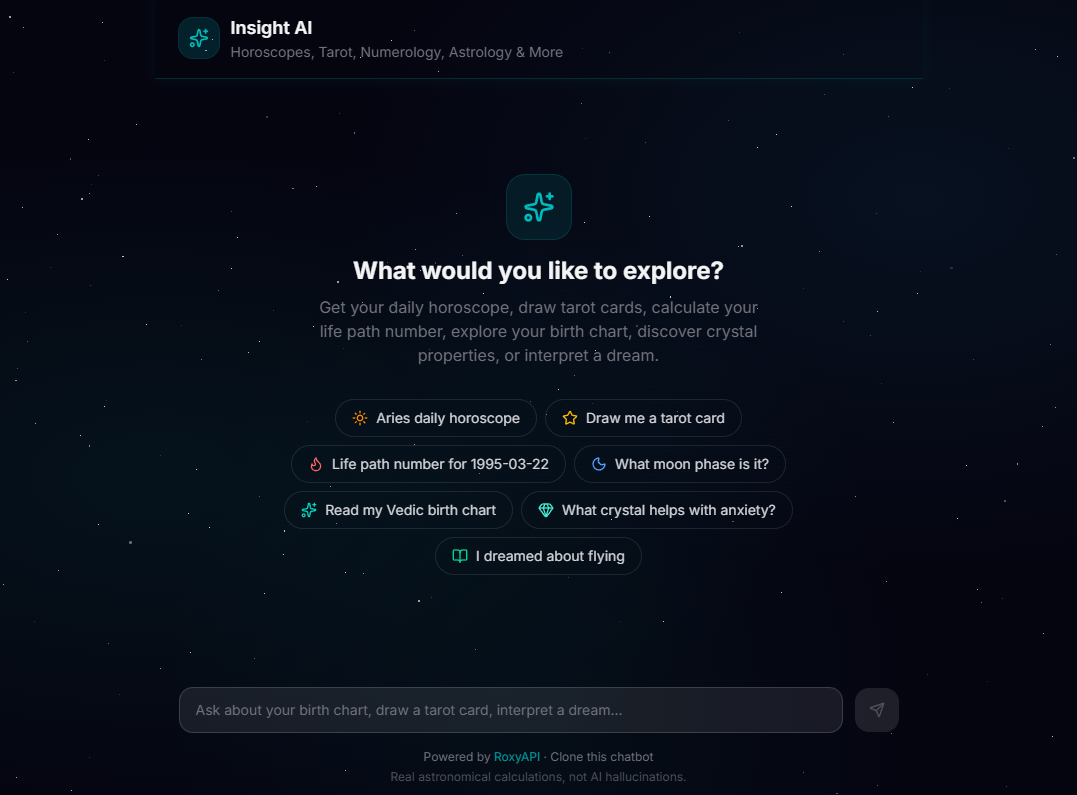
AI chatbot template with horoscope readings, tarot spreads, numerology calculations, Vedic and Western birth charts, crystals, angel numbers, and dream interpretation. Auto-discovers 258+ tools via MCP. Supports Gemini, Claude, and GPT. Build an AI astrology chatbot like AstroTalk.
A free open source template, not a subscription plan: clone it, add your API key and ship under your own brand. Comparing tiers? See pricing.
AstrologyVedicTarotNumerologyCrystalsDreamsI-ChingAngel Numbers
What it ships with
- Auto-discovers 258+ tools via Remote MCP, no per-tool glue code
- Multi-provider LLM support: Gemini, Claude, GPT, switch with one env var
- Streaming responses via Vercel AI SDK v6 with tool-call surfaces
- Renders every tool result as a real chart, spread or bodygraph with @roxyapi/ui-react beside the reply (generative UI)
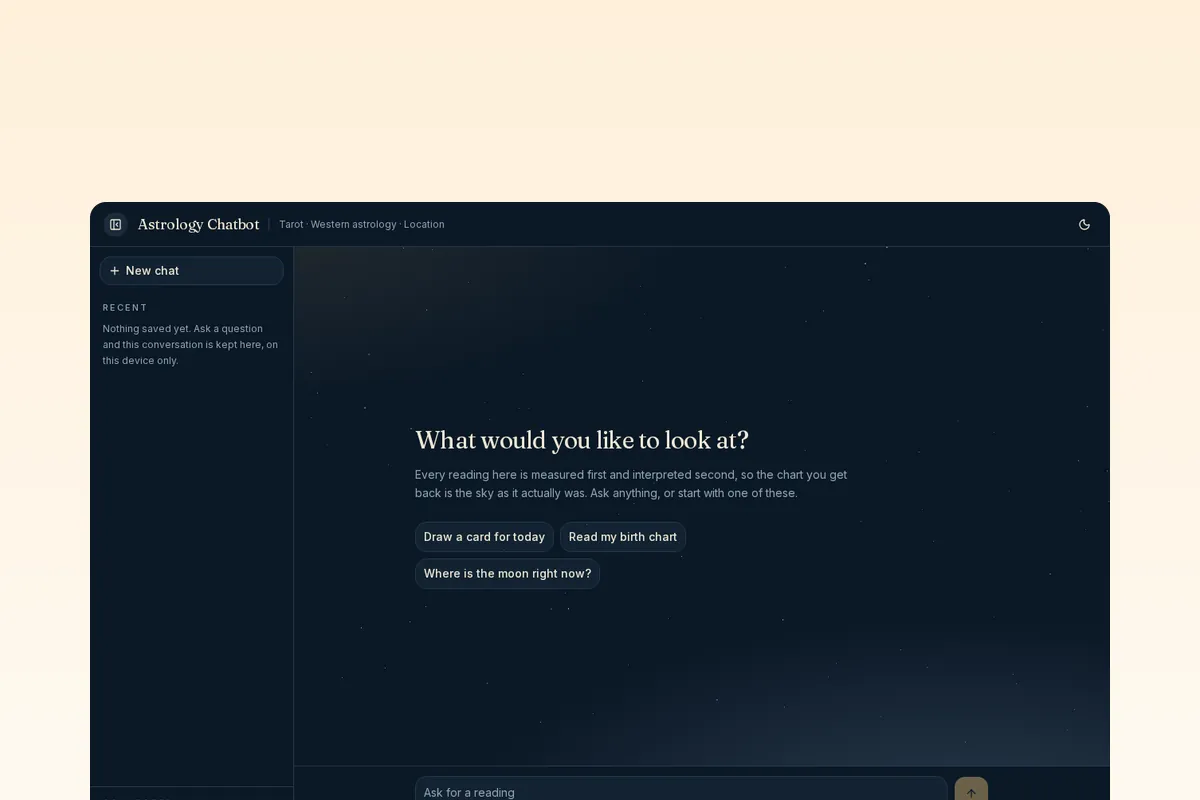
- Dark and light themes with a starfield, a sidebar of on-device recent conversations, and readings that follow the theme
- Deploys to Vercel with two env vars
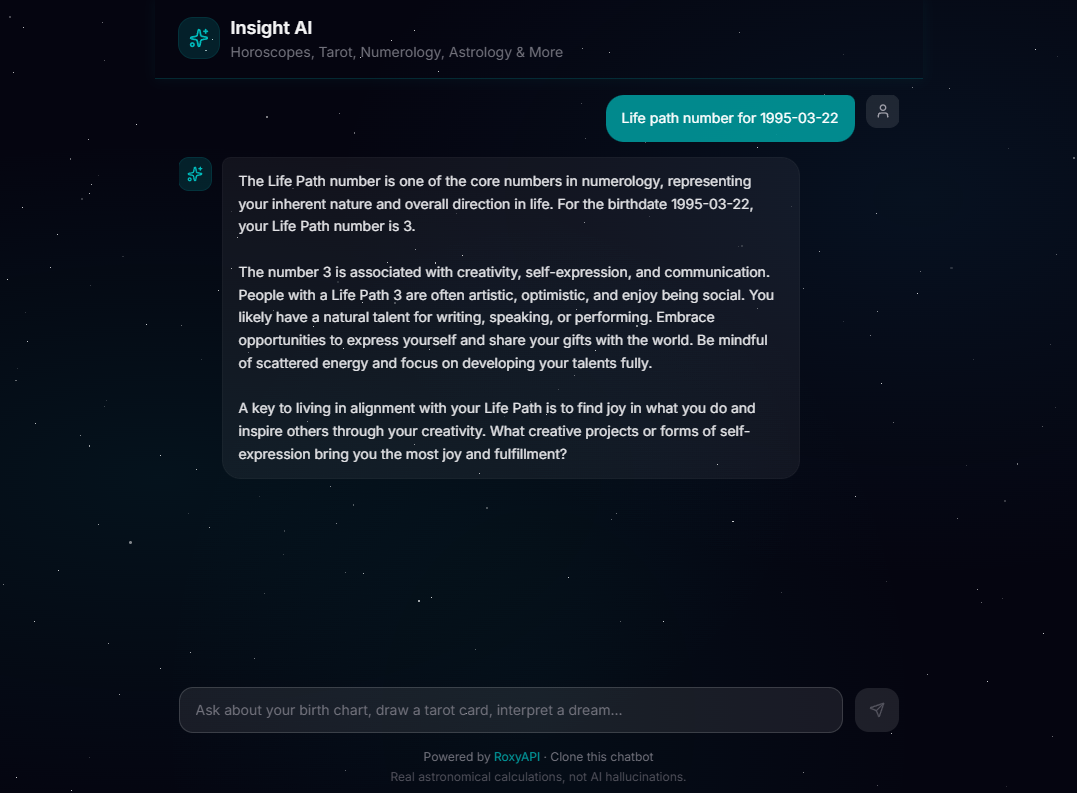
Screenshots
README
AI Astrology Chatbot: Western, Vedic, Tarot & More
Open source AI chatbot that runs real Western astrology, Vedic kundli, numerology, tarot, Human Design, forecast timelines, biorhythm, I Ching, crystals, dreams, and angel numbers calculations. Powered by RoxyAPI, not LLM hallucinations.







Ships with auto-discovered remote MCP tools, multi-provider LLM support (Gemini, Claude, GPT), and an interface built to be shown to customers: light and dark, a collapsible conversation list, and every chart drawn in the palette you choose.
Clone. Add keys. Deploy. Live AI astrology chatbot in 30 minutes.
| Dark | Light |
|---|---|
| |
Why This Exists
Most AI astrology chatbots hallucinate planet positions, make up tarot spreads, and invent numerology results. This one calls the 255+ verified tools at RoxyAPI via MCP (Model Context Protocol), gets real computed data from astronomical ephemeris engines and mathematical models, then has the LLM interpret it. Every birth chart, every tarot draw, every Life Path calculation is backed by actual computation.
17 spiritual domains plus location geocoding. Auto-discovered tools via MCP. Multilingual. Any LLM.
| Domain | What You Can Ask |
|---|---|
| Western Astrology | Natal chart, daily/weekly/monthly horoscopes, transits, synastry, compatibility score, moon phases |
| Vedic Astrology | Janam Kundli, Vimshottari Dasha, Gun Milan, detailed Panchang, Manglik/Kalsarpa/Sadhesati doshas, KP system, Navamsa |
| Forecast | Cross-domain timeline merging Western transits, Vedic dasha periods, and biorhythm critical days, with significance-scored key dates |
| Human Design | Full bodygraph, energy type, strategy, authority, profile, centers, channels, gate activations, two-person connection, transit overlay |
| Chinese Astrology | BaZi Four Pillars chart, Day Master strength, ten year luck pillars, annual forecast, zodiac animal and compatibility, lunisolar date conversion, the 24 solar terms, Tong Shu almanac and auspicious date selection |
| Feng Shui | Kua number and Eight Mansions directions, flying star natal chart, annual and monthly star overlays, bagua sectors, annual afflictions, the nine periods |
| Mesoamerican Astrology | Tzolkin day sign, full Mayan chart with Haab and Long Count, Long Count conversion, nawal compatibility, trecenas, Aztec tonalpohualli |
| Vastu | Entrance pada, Vastu Purusha Mandala, plot analysis, Ayadi proportions, room compliance, griha pravesh dates, the eight directions |
| Numerology | Life Path, Expression, Soul Urge, Personal Year, full chart, compatibility |
| Kabbalah | Gematria with every Hebrew spelling shown, name and birth profiles, the 72 names, Tree of Life and sephirot, Hebrew letters, name comparison |
| Tarot | Three-card spreads, Celtic Cross, love spread, daily card, yes/no oracle |
| Biorhythm | Physical, emotional, intellectual cycle charts, multi-day forecasts, critical-day alerts |
| Ayurveda | Constitution from the birth chart, dinacharya day routine, ritucharya season, daily reading, the three doshas, six tastes, twenty qualities |
| I Ching | Hexagram readings, daily cast, full 64-hexagram catalog with changing lines |
| Crystals | Stones by zodiac, by chakra, birthstones by month, healing properties |
| Dreams | 2,000+ dream symbols, recurring patterns, archetypes |
| Angel Numbers | Spiritual meaning of 111, 222, 333, 444, 1111, and any positive integer via digit-root fallback |
| Location | City autocomplete with latitude, longitude, IANA timezone: turns "born in Mumbai" into chart-ready coordinates so users never type lat/long |
Responds in the language the person writes in: Hindi, Spanish, French, German, Japanese, and more.
Quick Start
git clone https://github.com/RoxyAPI/astrology-ai-chatbot.git
cd astrology-ai-chatbot
npm install
cp .env.example .env.local
# Add your keys to .env.local
npm run dev
Open localhost:3000 and start chatting.
You need two keys:
| Key | Where to get it |
|---|---|
| RoxyAPI | roxyapi.com/pricing, powers all readings and calculations |
| LLM | Google, Anthropic, or OpenAI, interprets the data (see below) |
Choose Your LLM
Swap providers with one env var. All three use the unified interface in the Vercel AI SDK, same code, different model:
| Provider | Env Var | Model | Cost / 1M tokens |
|---|---|---|---|
| Google Gemini (default) | GOOGLE_GENERATIVE_AI_API_KEY | Gemini 2.5 Flash | $0.30 / $2.50, has free tier |
| Anthropic | ANTHROPIC_API_KEY | Claude Haiku 4.5 | $1.00 / $5.00 |
| OpenAI | OPENAI_API_KEY | GPT-5 mini | $0.13 / $1.00 |
LLM_PROVIDER=gemini
GOOGLE_GENERATIVE_AI_API_KEY=your_key
How It Works
User message → LLM picks a tool → MCP calls RoxyAPI → Real data returned → LLM interprets → Streams to user- User asks a question ("What does my Saturn placement mean?")
- The LLM selects the right tool from 160+ auto-discovered MCP tools
- RoxyAPI computes the answer from verified astronomical/mathematical engines
- The LLM interprets the structured data into a natural, personalized response
- Response streams back in real-time with markdown formatting
No prompt-stuffing. No fake data. No hardcoded horoscopes.
Widgets From Tool Calls
Ask for a tarot card and the card is drawn on screen, art and all, above the reading the model writes. Ask for a natal chart and the wheel renders with its aspect lines, planet list, and aspect grid, in the same message as the interpretation.
| Tarot card, dark | Natal wheel, light |
|---|---|
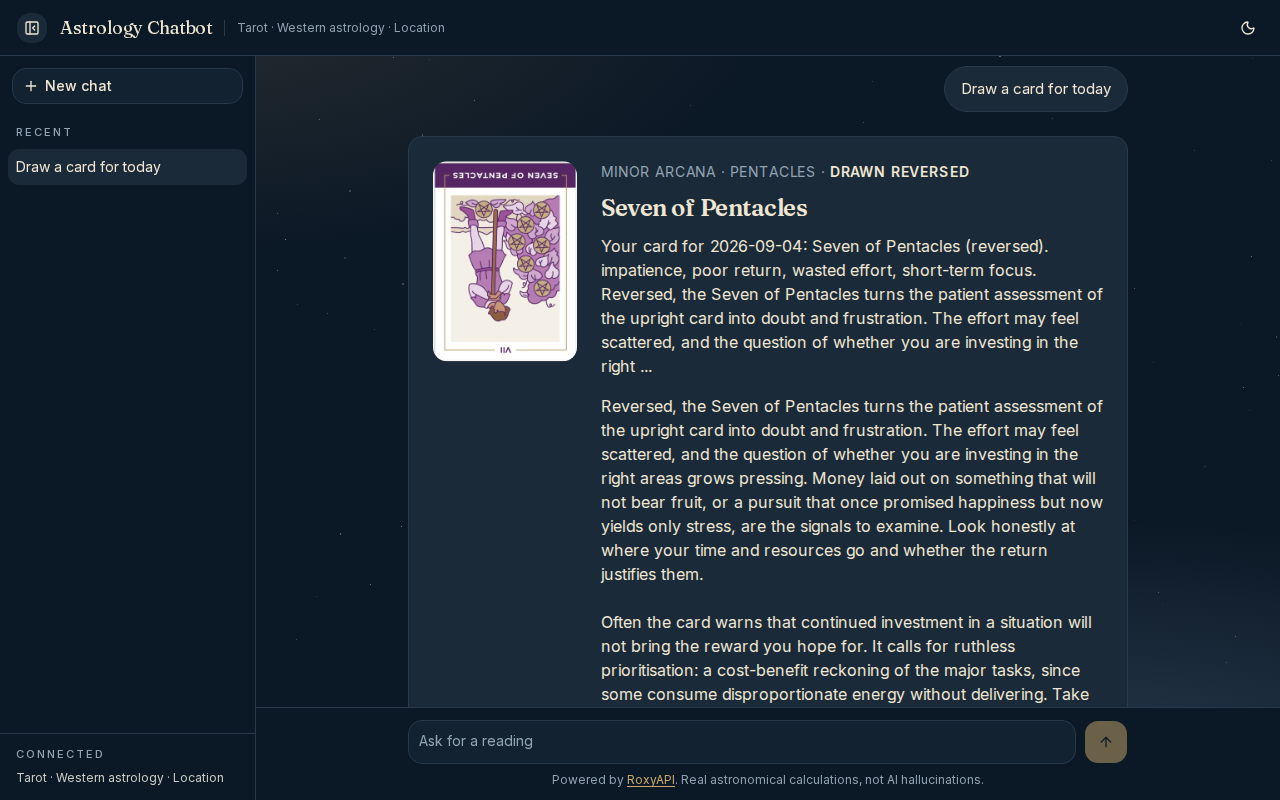 | 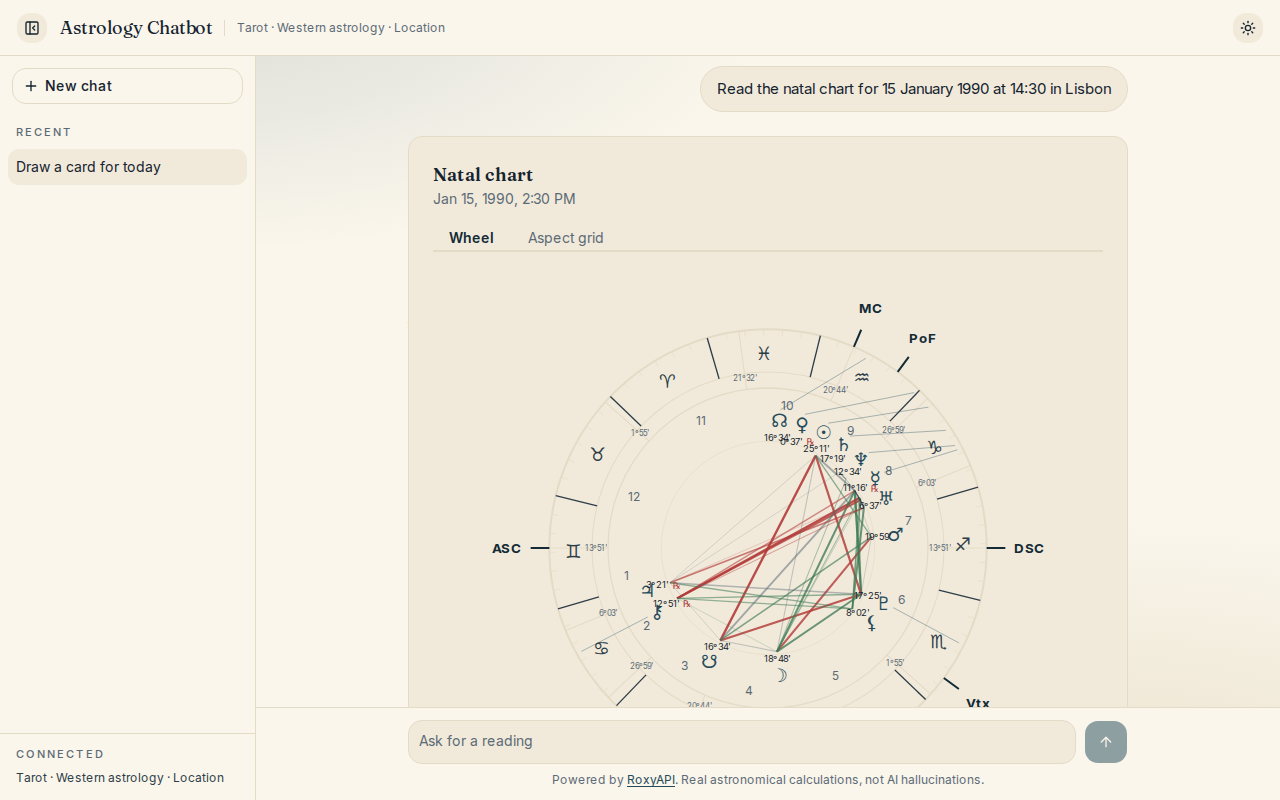 |
Nothing is wired per tool. @roxyapi/ui-react carries a lookup from the tool name the model used to the component that draws its result, so every domain you enable renders itself. A tool no component covers, a reference lookup for instance, simply keeps the written answer.
| File | What it does |
|---|---|
src/lib/tool-widgets.ts | Turns a chat message into the list of components to draw |
src/components/chat/ToolWidget.tsx | Renders that list above the prose in the assistant bubble |
Widgets wear the chat palette rather than a theme of their own. Every surface, ink, border, status colour, face and corner a drawing paints comes from a --roxy-* token, and globals.css points the whole set at the app palette in one block, so a chart is the same material as the page it arrives on:
:root {
  --roxy-surface: var(--card);
  --roxy-accent: var(--primary);
  /* and the rest of the set */
}
Every value is a reference rather than a colour, so the dark palette moves the drawings with everything else and there is no second copy to keep in step. Recolour the palette and the drawings follow, in both themes and at any width. Restyling a component is never the answer, and tests/design-tokens.test.ts fails if a token is given a colour of its own. THEMING.md covers every token, its light and dark default and what it paints. The UI components page lists every component, and the AI chat widgets tutorial covers the same pattern for other chat frameworks and model vendors.
MCP Tool Discovery
This chatbot uses Model Context Protocol (MCP) to automatically discover all available tools from RoxyAPI at runtime. No manual endpoint wiring, all 255+ tools across 17 spiritual domains plus location geocoding are ready to use out of the box.
How MCP connections work
MCP connections are initialized once and cached automatically. The first request after a deploy takes ~1-2 seconds to set up; every request after that reuses the cached tools instantly.
Choosing which products to enable
By default all 18 RoxyAPI products are enabled (~255 tools across 17 spiritual domains plus location for geocoding). To use a subset, set the ROXYAPI_PRODUCTS env var:
# Enable only tarot and astrology (fewer tools = faster model selection)
# Tip: keep `location` enabled whenever you enable a chart product (astrology, vedic-astrology).
# It is what lets the LLM resolve "born in Mumbai" to coordinates before calling the chart.
ROXYAPI_PRODUCTS=tarot,astrology,location
Available product slugs: astrology, vedic-astrology, forecast, human-design, chinese-astrology, feng-shui, mesoamerican-astrology, vastu, numerology, kabbalah, tarot, biorhythm, ayurveda, iching, crystals, dreams, angel-numbers, location. Legacy -api suffixed slugs (e.g. tarot-api) still work for backwards compat. The list that ships is DEFAULT_PRODUCTS in src/lib/mcp.ts, so check there when a new RoxyAPI domain appears.
Tool count recommendations
| Tool Count | LLM Behavior | Recommendation |
|---|---|---|
| 10-30 tools | Fast, accurate tool selection | Best for focused use cases (e.g. tarot + astrology only) |
| 30-80 tools | Good with capable models (Gemini 2.5 Flash, GPT-5 mini, Claude Haiku 4.5) | Good balance for most deployments |
| 80-150 tools | Works but slower; model may occasionally pick the wrong tool | Increase MAX_TOOL_STEPS if needed |
| 255+ tools | Where the full default catalogue sits, all 18 products enabled. Capable models handle it; smaller ones start picking the wrong tool as descriptions compete for context | Trim ROXYAPI_PRODUCTS to the domains you actually need |
Tip: If you are building a focused product (e.g. a tarot-only app), set
ROXYAPI_PRODUCTS=tarotto give the LLM fewer options and faster, more accurate tool selection.
Architecture
src/
├── app/
│   ├── api/chat/route.ts     # Chat endpoint, streamText + MCP tools
│   ├── layout.tsx            # Root layout, the two typefaces, theme provider, metadata
│   ├── page.tsx              # Home page with structured data
│   └── globals.css           # The design system: light palette, dark palette, widget bridge
├── components/
│   ├── chat/
│   │   ├── ChatShell.tsx     # Header, sidebar, transcript, conversation switching
│   │   ├── ChatHeader.tsx    # Wordmark, connected domains, theme and view controls
│   │   ├── ChatSidebar.tsx   # New chat, recent conversations, connected list
│   │   ├── ChatPanel.tsx     # One conversation: transcript, composer, attribution
│   │   ├── MessageList.tsx   # Transcript, opening screen, four openers
│   │   ├── MessageBubble.tsx # One turn, markdown for the reply
│   │   ├── MessageInput.tsx  # Growing composer, send and stop
│   │   └── ToolWidget.tsx    # Draws the components a tool result earned
│   ├── theme-provider.tsx    # Light and dark, remembered
│   ├── theme-toggle.tsx      # The control in the header
│   └── StarField.tsx         # The night sky, seeded so it hydrates cleanly
└── lib/
    ├── ai.ts                 # Multi-provider LLM config (Gemini/Claude/GPT)
    ├── mcp.ts                # MCP client, connects to RoxyAPI and caches all tools
    ├── prompts.ts            # System prompt, personality, capabilities, multilingual
    ├── tool-widgets.ts       # Maps a tool result to the component that renders it
    ├── conversations.ts      # Recent conversations, kept in the browser only
    └── domains.ts            # The reading name for each connected product
Key design decisions:
- MCP over REST: tools are auto-discovered from the RoxyAPI MCP servers. No manual endpoint definitions needed.
- Persistent MCP connections: connections are initialized once and cached. No per-request overhead.
- Server-side only: all API keys stay in the Next.js API route. Nothing leaks to the client bundle.
- Model agnostic: Vercel AI SDK v6 abstracts the LLM. Swap Gemini for Claude or GPT with one env var.
- SSR + JSON-LD: structured data and meta tags render server-side for search engine visibility.
Features
- Tool result widgets: a tarot card, natal wheel, or bodygraph renders above the interpretation, in the palette you chose
- Light and dark: dark on a first visit, one control in the header, and the choice is remembered. The drawn charts follow the switch
- Conversation history: recent conversations listed in the sidebar, kept in the browser under one key and bounded at twenty. Nothing is sent anywhere and there is no account
- Collapsible sidebar: a panel on a wide screen, a drawer on a phone, closed with the escape key
- Markdown responses: assistant messages render with full markdown support (headings, bold, lists, code blocks, tables, links). A wide table scrolls in its own frame
- A composer that behaves: grows with what you type up to a cap, enter sends, shift and enter makes a newline, and a second submit cannot start a second turn
- Stop button: cancel a long-running response mid-stream
- Rate limiting: built-in per-IP rate limiter (20 req/min) to protect LLM API credits
- Input validation: request body validation with message count cap to prevent abuse
- Security headers: X-Content-Type-Options, X-Frame-Options, Referrer-Policy
- Accessible: zero axe violations in both themes, a visible focus ring on every control,
role="log"on the transcript, and reduced motion respected
Stack
| Layer | Tech |
|---|---|
| Framework | Next.js 16 (App Router, React 19) |
| AI | Vercel AI SDK v6, streaming, tool calling, multi-provider |
| Data | RoxyAPI: 255+ tools, 17 spiritual domains plus location, Remote MCP |
| Tool Discovery | MCP via @ai-sdk/mcp, auto-discovers tools at runtime |
| Widgets | @roxyapi/ui-react: charts, spreads, and tables that render a tool result |
| UI | Tailwind CSS v4 + shadcn/ui, one palette in two themes |
| Type | Fraunces and Inter, self hosted through next/font |
| Theming | next-themes, dark by default, remembered |
| SEO | Server-rendered JSON-LD (schema.org), Open Graph, keyword meta tags |
Customize
AI personality: edit src/lib/prompts.ts. Make it mystical, clinical, casual, or match your brand.
Which domains: set the ROXYAPI_PRODUCTS env var, or edit the product list in src/lib/mcp.ts.
Colours: the whole product is two blocks in globals.css, :root for light and .dark for dark. Edit those and everything follows, the drawn charts included, because every --roxy-* token is a reference into the same palette. npm test fails if a token goes missing from one theme.
Typefaces: two families in layout.tsx, loaded through next/font as CSS variables. Swap a face there and in the matching line of globals.css.
Layout and copy: the screen is in src/components/chat/. The openings offered on an empty screen are in src/lib/domains.ts, each tagged with the product that answers it, so trimming ROXYAPI_PRODUCTS never offers a reading your deployment cannot give. Everything is Tailwind, no CSS-in-JS.
Tool step limit: set MAX_TOOL_STEPS in your env to control how many tool-call round-trips the LLM can make per message (default: 5).
Environment Variables
| Variable | Required | Default | Description |
|---|---|---|---|
ROXY_API_KEY | Yes | none | Your RoxyAPI API key (get one) |
LLM_PROVIDER | No | gemini | LLM provider: gemini, anthropic, or openai |
GOOGLE_GENERATIVE_AI_API_KEY | If Gemini | none | Google AI API key |
ANTHROPIC_API_KEY | If Anthropic | none | Anthropic API key |
OPENAI_API_KEY | If OpenAI | none | OpenAI API key |
ROXYAPI_MCP_URL | No | https://roxyapi.com/mcp | Base URL for MCP endpoints |
ROXYAPI_PRODUCTS | No | All 18 products | Comma-separated list of product slugs to enable |
MAX_TOOL_STEPS | No | 5 | Max tool-call round-trips per message |
Deploy
One-click deploy to Vercel:
Or deploy anywhere that runs Node.js:
npm run build && npm startSecurity
- API keys are server-side only, never exposed to the browser
- All RoxyAPI calls happen in the Next.js API route via MCP, not the client
- Per-IP rate limiting on the chat endpoint (20 requests/minute)
- Request body validation with message count limits
- Security headers (X-Content-Type-Options, X-Frame-Options, Referrer-Policy)
- Markdown rendered safely via
react-markdown(nodangerouslySetInnerHTML, HTML is escaped) - External links use
rel="noopener noreferrer"to prevent tab-nabbing
FAQ
How many tools can the LLM handle?
The default setup exposes ~255 tools from 18 RoxyAPI products (17 spiritual domains plus location for geocoding). Modern models like Gemini 2.5 Flash, GPT-5 mini, and Claude Haiku 4.5 handle this well. If you see the model picking the wrong tool or making excessive tool calls, reduce the product count via ROXYAPI_PRODUCTS, fewer tools means faster, more accurate selection.
The chatbot is unstable or sometimes does not respond
This is almost always caused by MCP initialization timing out. The default maxDuration is 60 seconds, which should be enough. If you are on the Vercel Hobby plan (10s limit), upgrade to Pro or reduce the number of products. Also check that your ROXY_API_KEY is valid.
Do MCP connections stay open forever?
MCP connections persist for the lifetime of your server process. On Vercel, they are refreshed automatically when your function recycles after a period of inactivity. You do not need to manage connection lifecycle manually.
Why is the first message slow?
The first request after a deploy (or after your server has been idle for a while) initializes all MCP connections and fetches tool definitions (~1-2 seconds). Every request after that is instant.
How do I change the AI personality?
Edit the system prompt in src/lib/prompts.ts. The default personality is a warm, knowledgeable spiritual advisor. You can make it more mystical, clinical, casual, or match your brand voice.
Can I disable specific product domains?
Yes. Set ROXYAPI_PRODUCTS in your environment to only include the slugs you want:
ROXYAPI_PRODUCTS=tarot,numerologyIs this free to use?
The code is free and open source. You will need a RoxyAPI key (you can request a free test key to try it out) and an LLM provider key (Gemini has a free tier).
Links
| Resource | URL |
|---|---|
| RoxyAPI Homepage | roxyapi.com |
| Quickstart | roxyapi.com/docs/quickstart |
| Live API Reference | roxyapi.com/api-reference |
| MCP Integration | roxyapi.com/docs/mcp |
| Methodology (NASA JPL verified) | roxyapi.com/methodology |
| Pricing | roxyapi.com/pricing |
| All Products | roxyapi.com/products |
| Starter Apps | roxyapi.com/templates |
Built with RoxyAPI, the data engine behind real astrology, tarot, and numerology calculations.
Ready to ship?
Clone the repo, add your API key, deploy to your stack.