
- Built with
- React NativeExpoTypeScriptNativeWind
- Powered by these APIs
One key covers all 18 domains.
- License
- MIT licensed and white label: clone it, modify it and ship it under your own brand.
Mobile App / Open Source30 minMIT LicenseWhite-label ready
Western Astrology App
Birth charts. Horoscopes. Transits. Zodiac compatibility.
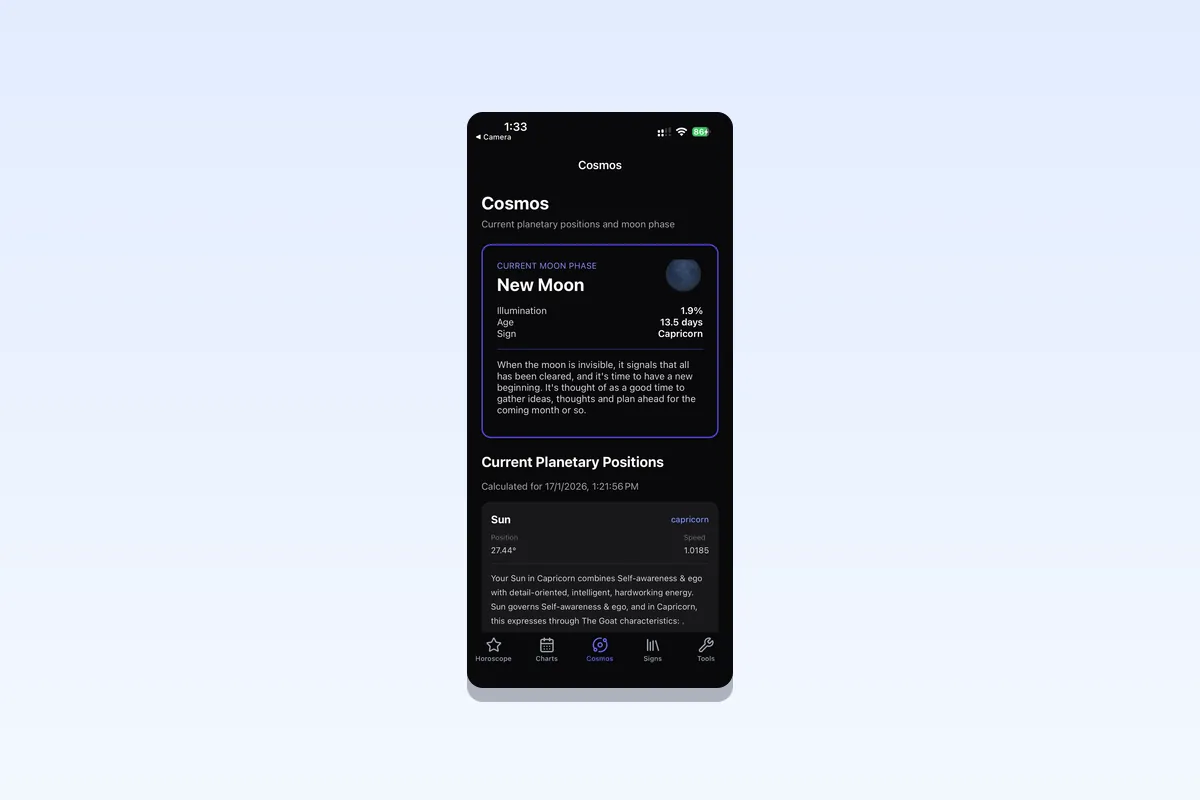
Astrology template with natal birth chart generator (Placidus, Koch, Whole Sign), zodiac sign compatibility, daily horoscopes, and planet transit tracking. Build a horoscope or astrology dating app for iOS and Android.
A free open source template, not a subscription plan: clone it, add your API key and ship under your own brand. Comparing tiers? See pricing.
Birth ChartsHoroscopesTransitsCompatibility
What it ships with
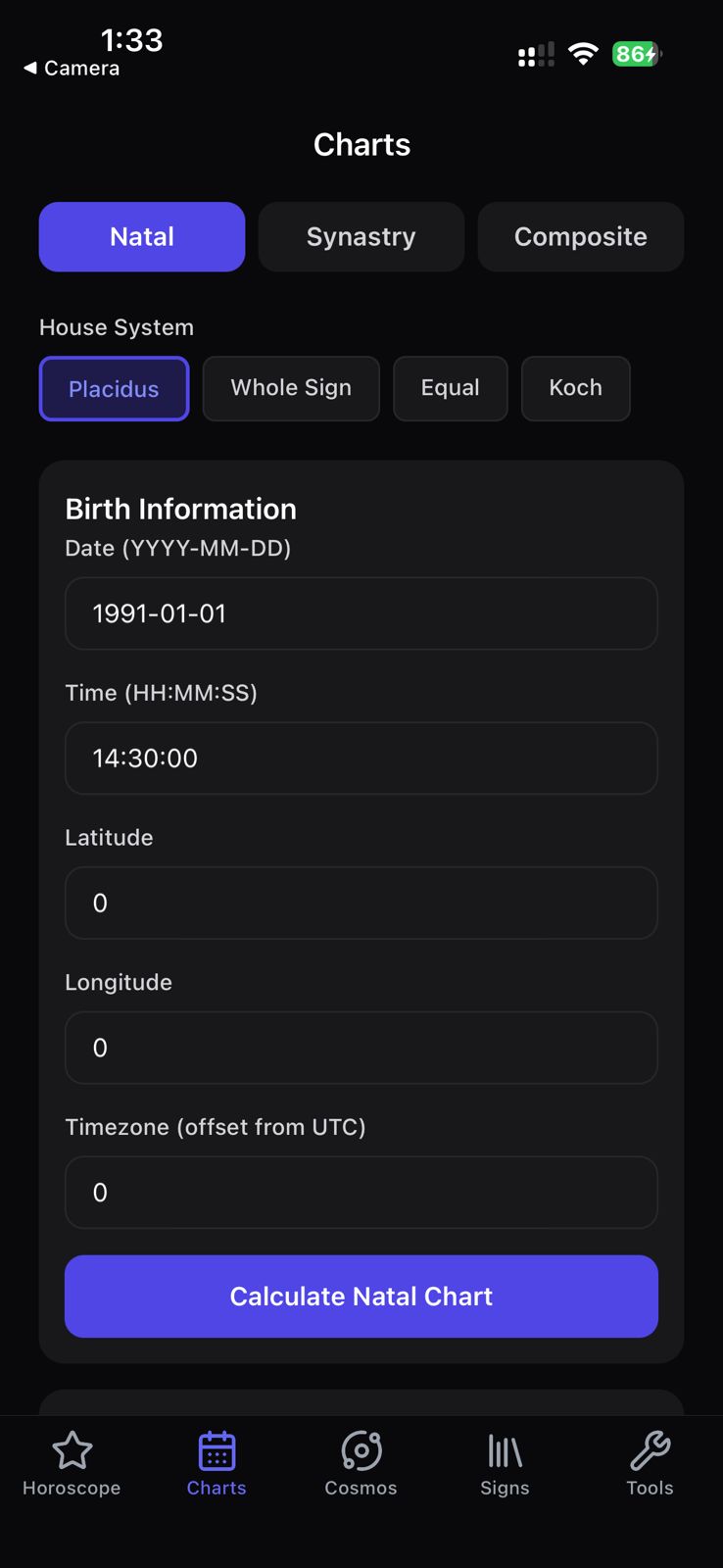
- Natal chart generator with Placidus, Koch, and Whole Sign house systems
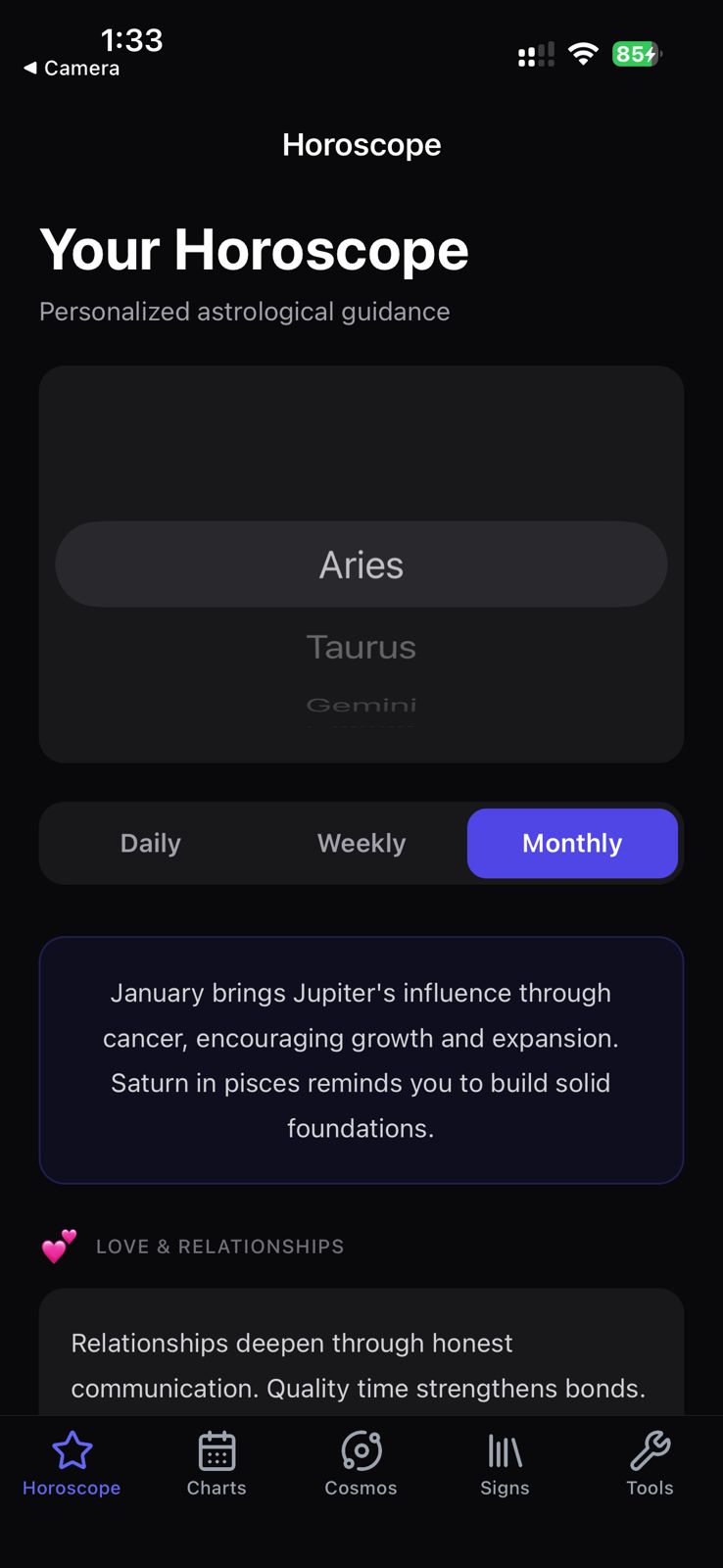
- Daily, weekly, monthly, and yearly horoscopes for all 12 signs
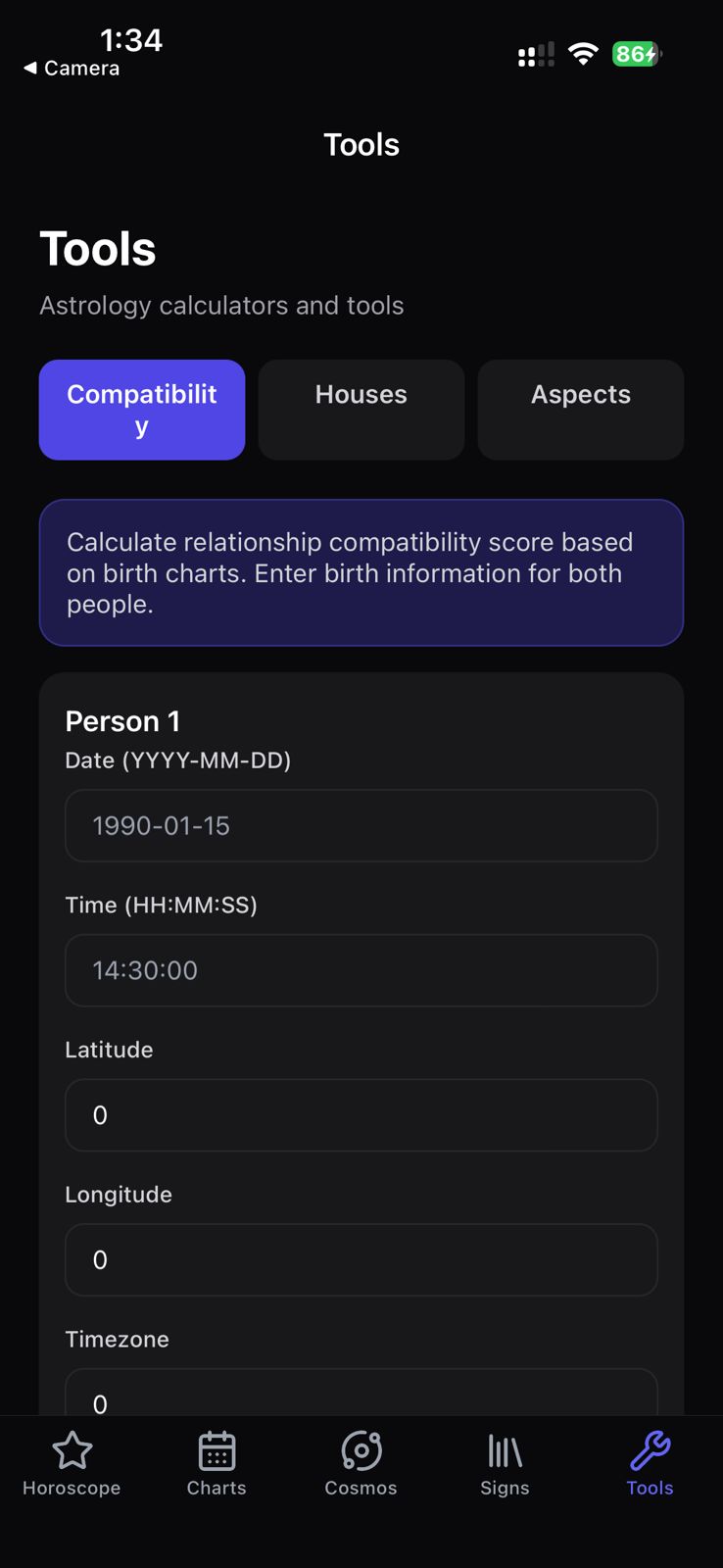
- Zodiac compatibility scoring for dating-app style surfaces
- Planet transit tracking with aspect highlights
- Expo + NativeWind builds for iOS, Android, and web
Screenshots
README



Open-source React Native (Expo) template for a Western astrology app: daily, weekly, and monthly horoscopes, natal charts, synastry, composite charts, compatibility scoring, live planetary positions, current moon phase, and the full zodiac reference. Built on the Roxy Astrology API and the official @roxyapi/sdk. One API key, every astrology endpoint, full control over your native UI. Verified against NASA JPL Horizons.
Fork it, set one environment variable, and ship.
Screenshots
What you get
- Horoscopes in daily, weekly, and monthly form for all 12 signs, with love, career, health, and finance sections plus lucky numbers and compatible signs.
- Natal chart with all planets, house cusps, and aspects, in Placidus, Whole Sign, Equal, or Koch house systems.
- Synastry with the full inter-aspect grid and an overall compatibility score for two charts.
- Composite chart that merges two birth charts into one relationship chart.
- Compatibility score with a category breakdown, strengths, challenges, and an aspect summary.
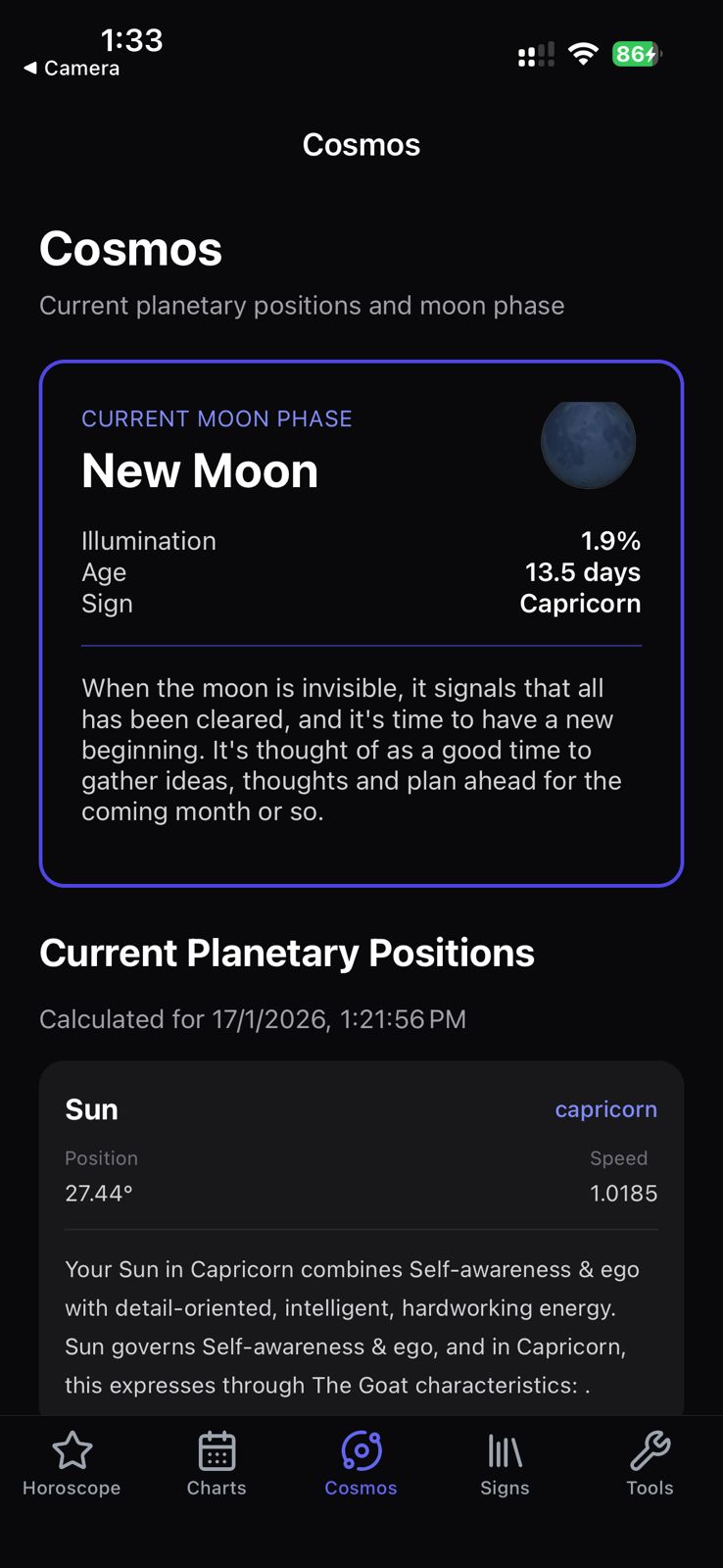
- Cosmos with live planetary positions and the current moon phase.
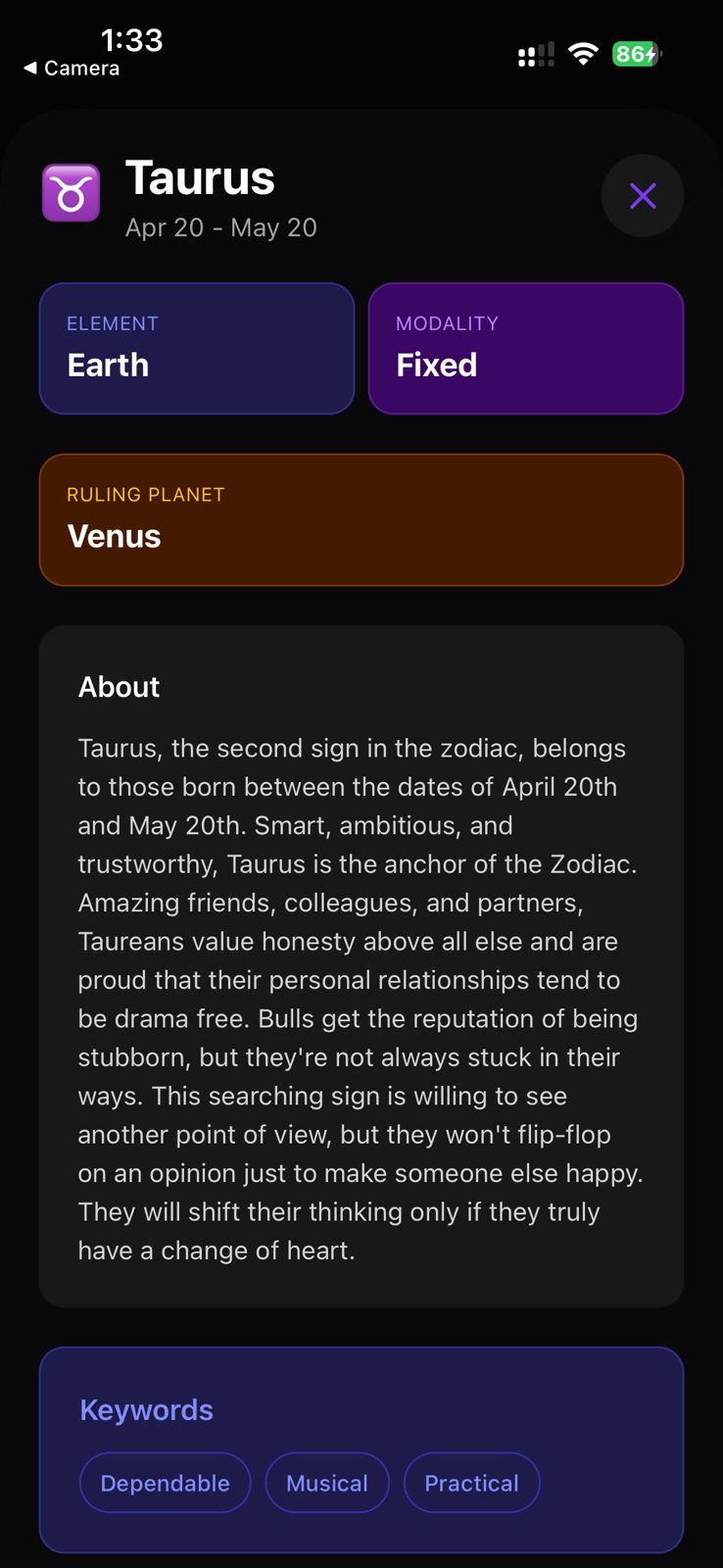
- Zodiac reference for all 12 signs with element, modality, ruling planet, keywords, strengths, and famous people.
- Built-in city geocoding so users pick a birth city and never type coordinates.
- Dark mode that follows the device setting.
Stack
| Technology | Purpose |
|---|---|
| Expo SDK 57 | React Native runtime and build tooling |
| Expo Router | File-based navigation with bottom tabs |
| @roxyapi/sdk | Fully typed RoxyAPI client. One key, every domain. |
| NativeWind v4 | Tailwind CSS for React Native |
| Roxy Astrology API | Natal charts, horoscopes, synastry, moon phase, zodiac data |
Quick start
1. Clone and install
git clone https://github.com/RoxyAPI/astrology-starter-app.git
cd astrology-starter-app
npm install
2. Get your API key
Get instant access at roxyapi.com/pricing. One key unlocks every astrology endpoint. Add it to .env:
EXPO_PUBLIC_ROXY_API_KEY=your-api-key-hereBundled key caveat. A mobile app has no server, so any
EXPO_PUBLIC_*value is compiled into the build and can be read off a device. For production, use a key restricted to your bundle id in the dashboard, or route calls through a thin backend proxy that holds the real key. Never ship an unrestricted key.
3. Run
npm start          # dev server, then press i, a, or w
npm run ios        # iOS simulator (macOS only)
npm run android    # Android emulator
npm run web        # web
npm test           # data-layer tests
npm run typecheck  # TypeScript, no emit
How it works
The SDK is the only data layer. There is no generated schema file to keep in sync: @roxyapi/sdk ships its own types from the same OpenAPI spec the API serves, so a response flows straight into a screen with no glue code.
One typed client
// src/api/client.ts
import { createRoxy } from '@roxyapi/sdk';

const key = process.env.EXPO_PUBLIC_ROXY_API_KEY ?? '';
export const roxy = createRoxy(key);
export const hasApiKey = (): boolean => Boolean(key);
One data layer, screens stay thin
Every screen imports from src/api. The data layer wraps each roxy.astrology.* and roxy.location.* call and unwraps the SDK { data, error } result into either the response or one thrown error the screen can catch:
// src/api/astrology.ts
export const astrologyApi = {
  getDailyHoroscope: async (sign) => unwrap(await roxy.astrology.getDailyHoroscope({ path: { sign } }), 'Failed to fetch daily horoscope'),
  // ...
};
Location first
Every chart needs latitude, longitude, and timezone, so the user picks a birth city and the app geocodes it. Never ask for raw coordinates.
const cities = await astrologyApi.searchCities('New York');
const city = cities[0];
const chart = await astrologyApi.getNatalChart({
  date: '1990-01-15',
  time: '14:30:00',
  latitude: city.latitude,
  longitude: city.longitude,
  timezone: city.timezone, // IANA string, resolved to the DST-correct offset for the chart date
});
Featured endpoints
The highest-demand Western astrology endpoints, in the order you are most likely to ship them. Every method name and field below comes from the OpenAPI spec.
import { createRoxy } from '@roxyapi/sdk';

const roxy = createRoxy(process.env.EXPO_PUBLIC_ROXY_API_KEY!);

// 1. Geocode the birth city first. Every chart needs latitude, longitude, timezone.
const { data: search } = await roxy.location.searchCities({ query: { q: 'New York' } });
const { latitude, longitude, timezone } = search.cities[0];

// 2. Natal chart. The number one Western query, called on every onboarding.
const { data: natal } = await roxy.astrology.generateNatalChart({
  body: { date: '1990-01-15', time: '14:30:00', latitude, longitude, timezone },
});
// natal.planets[].name, natal.houses[].sign, natal.aspects[].type

// 3. Daily horoscope. Highest per-user call frequency, drives daily actives and push.
const { data: horoscope } = await roxy.astrology.getDailyHoroscope({ path: { sign: 'aries' } });
// horoscope.overview, horoscope.love, horoscope.career, horoscope.luckyNumber

// 4. Synastry. The dating-app pro feature, full inter-aspect analysis between two charts.
const { data: synastry } = await roxy.astrology.calculateSynastry({
  body: {
    person1: { date: '1990-01-15', time: '14:30:00', latitude, longitude, timezone },
    person2: { date: '1992-07-22', time: '09:00:00', latitude, longitude, timezone },
  },
});
// synastry.compatibilityScore, synastry.interAspects, synastry.analysis.overall

// 5. Current moon phase. Viral for wellness, cycle-tracking, and meditation apps.
const { data: moon } = await roxy.astrology.getCurrentMoonPhase();
// moon.phase, moon.illumination, moon.age, moon.sign
Browse the rest in the API reference.
Project structure
app/                          # Expo Router screens
├── _layout.tsx               # Root Stack
└── (tabs)/
    ├── _layout.tsx           # Bottom tabs
    ├── index.tsx             # Daily, weekly, monthly horoscopes
    ├── charts.tsx            # Natal, synastry, composite charts
    ├── cosmos.tsx            # Live planet positions and moon phase
    ├── signs.tsx             # Zodiac reference library
    └── tools.tsx             # Compatibility calculator
src/
├── api/
│   ├── client.ts             # The one Roxy SDK client + hasApiKey guard
│   ├── astrology.ts          # Wraps roxy.astrology.* and roxy.location.*, unwraps { data, error }
│   ├── astrology.test.ts     # Data-layer tests with the SDK mocked
│   ├── types.ts              # SDK response types under app-friendly names
│   └── index.ts              # Barrel export
├── components/CityPicker.tsx  # Birth-city geocoding picker
└── constants/colors.ts        # appColors for React Native props
Customize
- Add a feature. Pick an astrology method, add a wrapper in
src/api/astrology.ts, call it from a screen. The SDK types come from the spec, so new endpoints flow through with no manual typing. - Change the theme. This app uses Tailwind colors through NativeWind. Swap
indigo-600in the screenclassNamestrings for any Tailwind color, and updateappColors.primaryinsrc/constants/colors.tsfor the React Native props. - Reuse the city picker.
CityPickerhandles geocoding for any new screen that needs a location.
Why Roxy
- Breadth. Western astrology plus Vedic astrology, forecast, human design, Chinese astrology, feng shui, Mesoamerican astrology, vastu, numerology, kabbalah, tarot, biorhythm, ayurveda, I Ching, crystals, dreams, and angel numbers under one key.
- Type-safe. The SDK types come from one OpenAPI pipeline, so response shapes cannot drift from what the API returns.
- Accurate. Calculations are verified against NASA JPL Horizons.
- Eight languages. Pass
query: { lang }on the reading endpoints for interpretations in English, Hindi, Turkish, Spanish, German, Portuguese, French, or Russian. - Remote MCP. Connect AI agents to every astrology endpoint at
roxyapi.com/mcp/astrology, no local setup.
Links
- Astrology API
- API reference and playground
- Get API key
- All templates
- Methodology and accuracy
- Connect AI agents via MCP
License
MIT
Ready to ship?
Clone the repo, add your API key, deploy to your stack.